Smart Counter (POS)
Audience: Pharmacy cashiers and pharmacists working the counter — plus anyone evaluating, selling, or supporting the Smart Counter.
Purpose: This is the front door to the Smart Counter guide. It explains the screen at a glance, then points you to the right page — a single task, a rule, or why a feature works the way it does.
Companion guides: the AI selling layer on this screen has its own guide — Smart Counsellor; to run the whole screen without a mouse, see Keyboard Navigation. What shipped and when: Smart Counter release notes.
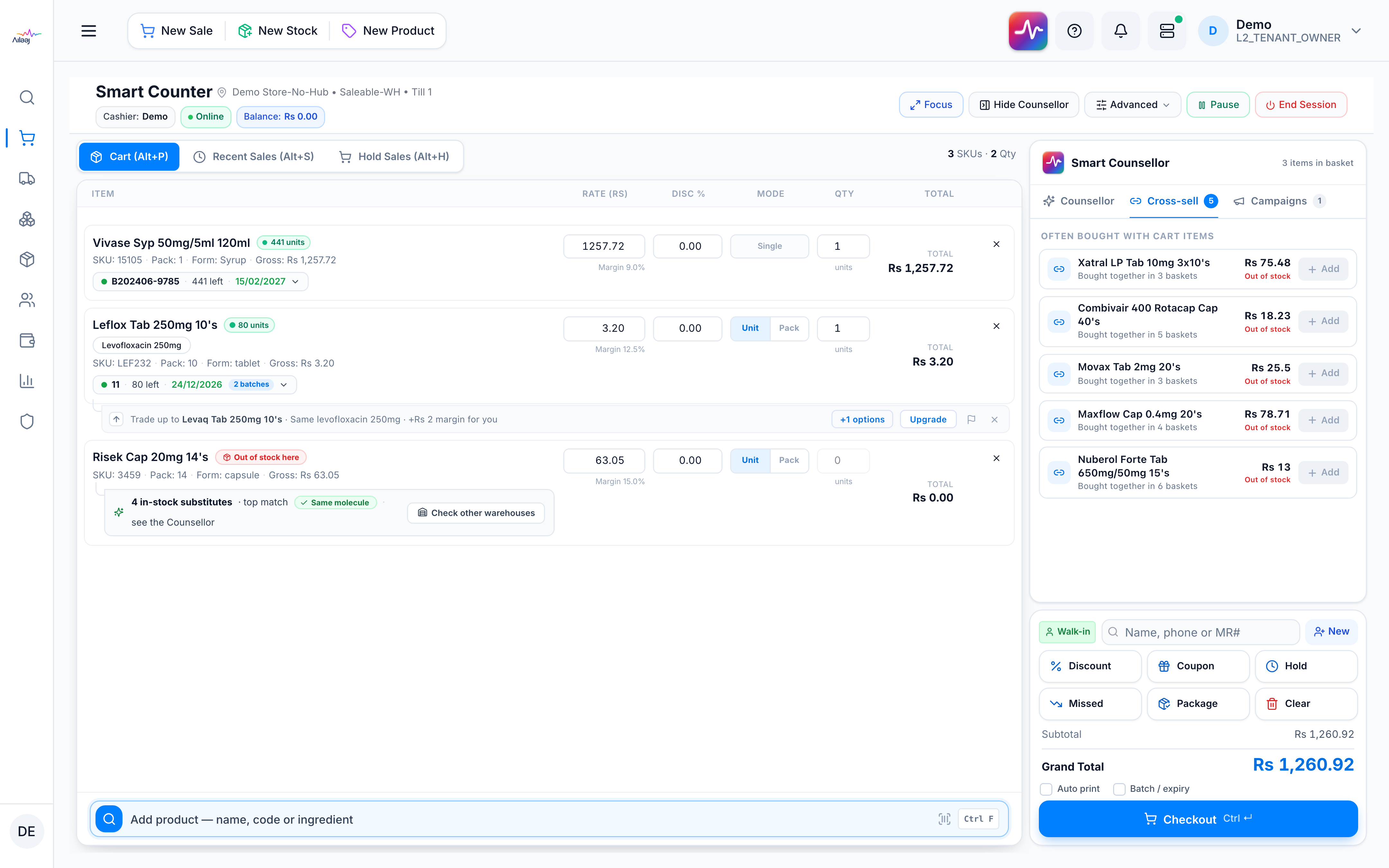
The Smart Counter is the point-of-sale screen. The session header shows your store · warehouse · till, the cashier, a status light (Online / Paused / Closed), and the current till Balance. Its controls are: Pause/Resume, End Session, Show / Hide Counsellor (collapse the AI panel to give the cart more room), Focus (full-screen cashier view), and an Advanced menu that holds switch location / till, sync now, the offline queue, and show / hide session stats (opening amount, balance, sales today).
Pick the kind of help you need
The Academy organises every guide as learn, do, look up, understand.
The screen
How to get there
In the app sidebar: Sell → Counter → Smart Counter Sale. You’ll first pick your store, warehouse, and till — see Open a till session.