Connect Your Custom Storefront
Audience: Tenant admins, engineers, and DevOps connecting a custom customer website to Ailaaj One.
Purpose: Create a Storefront API key, set scopes and routing, wire environment variables, and verify the connection.
Companion doc: Integration guide — public API flows, auth headers, checkout, and product detail fields.
Issue a Storefront API key in Admin → Platform → External APIs, bind checkout routing, and point your shop at the live /api/storefront endpoints.
What you are connecting
| Layer | Where it runs | Role |
|---|---|---|
| Ailaaj One Storefront API | {your-ailaaj-one-host}/api/storefront | Catalog, cart quote, checkout, customer accounts |
| Your customer website | Your domain (e.g. Cloudflare Workers) | UI — calls the API from SSR/server, not from the browser for secrets |
| OMS | Same Ailaaj One tenant | Orders created with orders.source = api |
Every request includes:
tenant_id=<your-tenant-uuid>(query string)X-API-Key: <storefront-api-key>(tenant API key from External APIs)
Customer sessions (order history, profile) also send X-Storefront-Session: <token> after login.
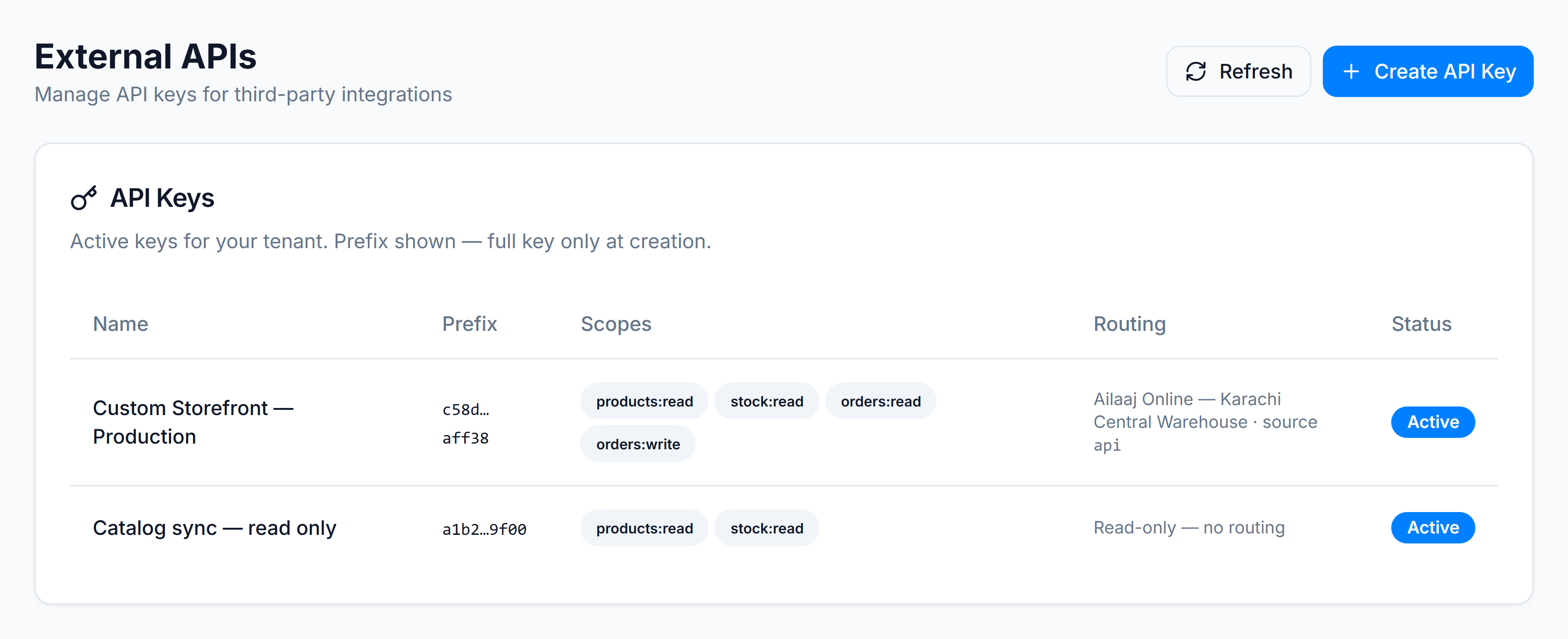
Step 1 — Open External APIs
In Ailaaj One, go to Admin → Platform → External APIs (/app/settings/external-apis).
You will see existing keys and a Create API Key button.
Step 2 — Create an API key and select scopes
Click Create API Key. Give the key a clear name (e.g. Custom Storefront — Production).
For a full custom storefront (browse, cart, checkout, accounts), enable these scopes:
| Scope | What it unlocks |
|---|---|
products:read | Categories, product list, product detail (PDP) |
stock:read | Cart quote — validates stock and pricing |
orders:read | Order tracking and logged-in order history |
orders:write | Place checkout orders in OMS |
checkout-sessions:write | Save in-progress checkout |
checkout-sessions:read | Resume a saved checkout |
customers:read / customers:write | Account, addresses, Auto-Refill |
prescriptions:write | Logged-in prescription upload |
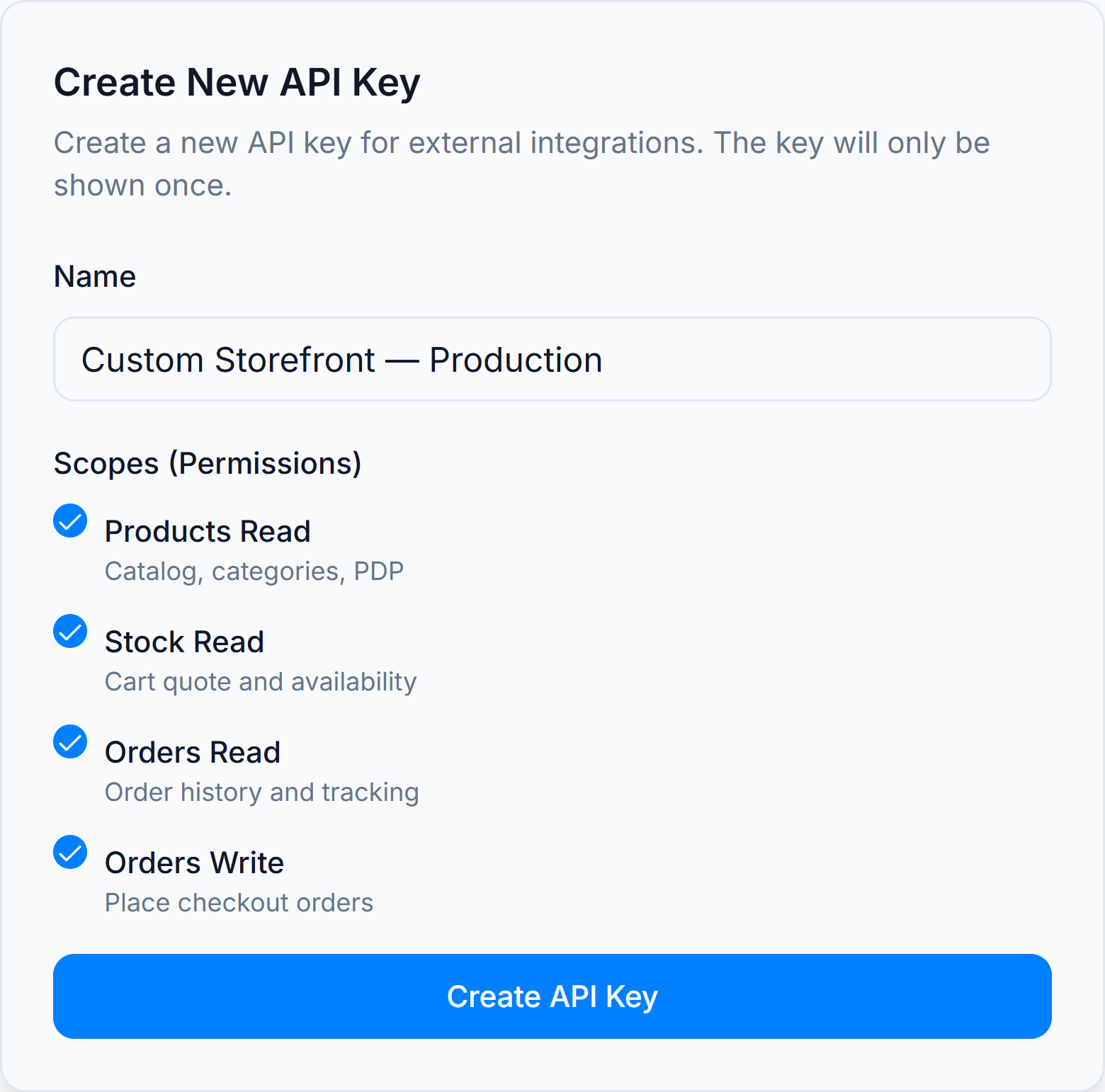
Copy the full key when shown — it is only displayed once. Store it in your deployment secrets (Vercel, Cloudflare, .env locally).
Read-only keys: If you only sync catalog to another system,
products:read+stock:readis enough — routing is optional.
Step 3 — Set routing defaults (required for checkout)
When orders:write is selected, routing defaults are required. They tell OMS which store, warehouse, shipment method, and payment methods this key uses for every API order.
| Field | Purpose |
|---|---|
| Default store | OMS store that owns the order |
| Default warehouse | Stock reservation and fulfilment source |
| Order source channel | Set to Custom Storefront (api) — maps to orders.source = api |
| Default shipment method | Delivery option and shipping cost at checkout |
| Prepaid / COD payment | Payment methods offered at checkout |
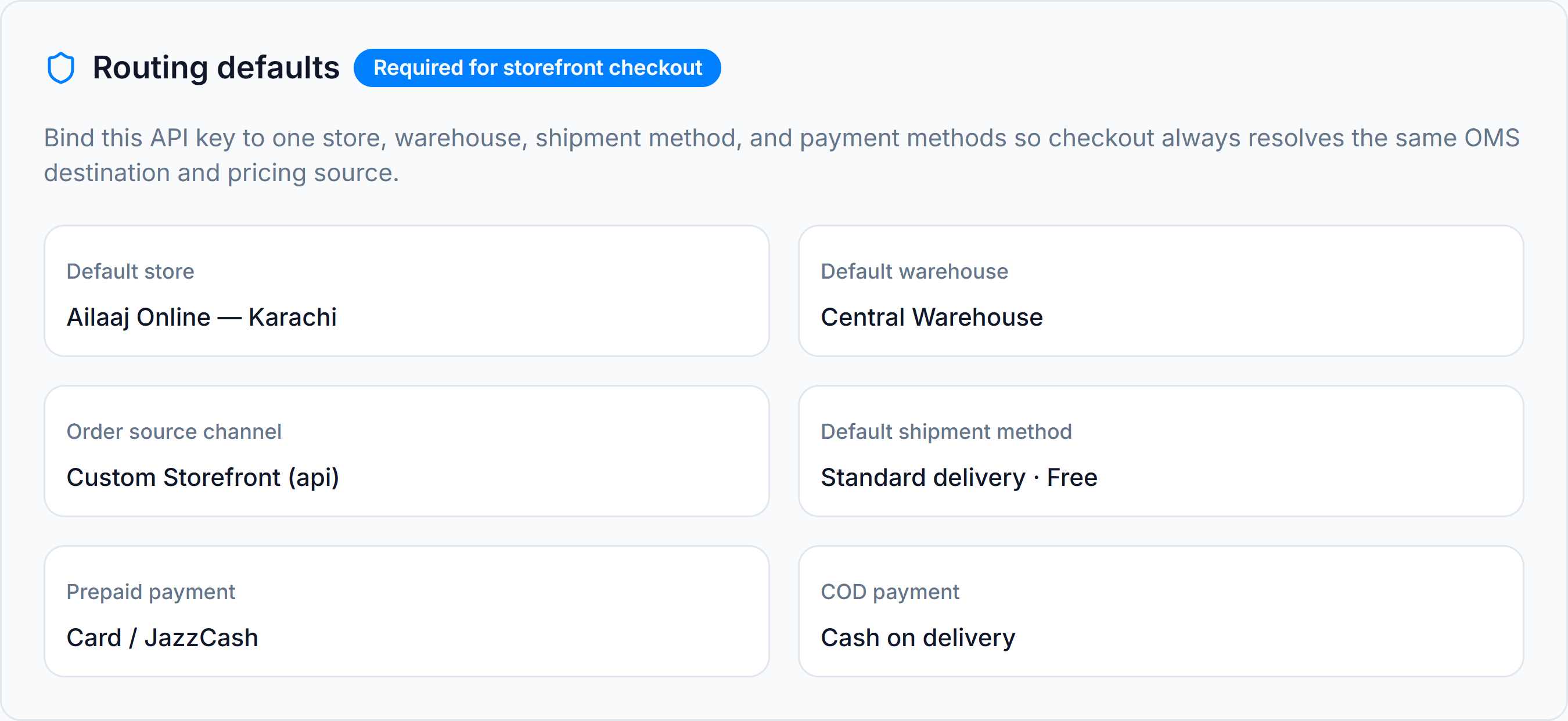
After saving, GET /api/storefront/config returns these defaults (including shipment cost) so your checkout page does not hard-code OMS IDs.
Step 4 — Wire your custom storefront platform
Point your customer website at the Storefront API. Example environment variables:
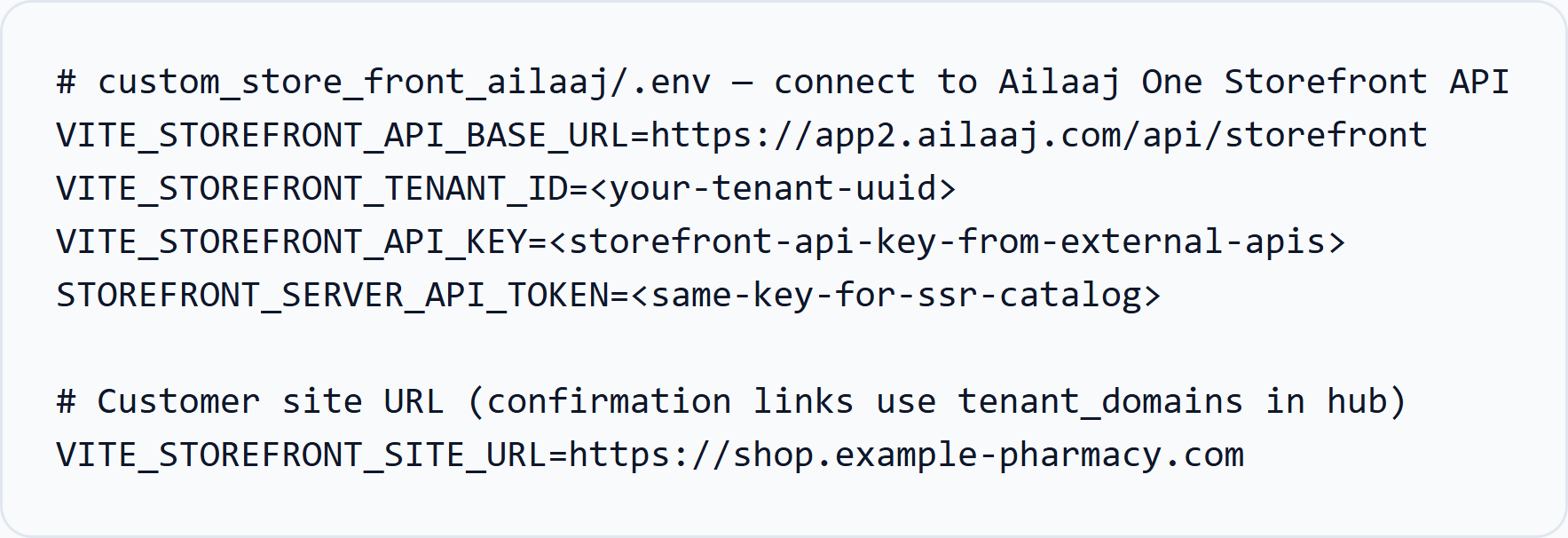
| Variable | Used by | Value |
|---|---|---|
VITE_STOREFRONT_API_BASE_URL | Client + server | https://{your-ailaaj-one-host}/api/storefront |
VITE_STOREFRONT_TENANT_ID | All calls | Your tenant UUID |
VITE_STOREFRONT_API_KEY | Browser-safe catalog calls (if proxied) | API key — prefer server proxy in production |
STOREFRONT_SERVER_API_TOKEN | SSR / Workers server | Same API key for cart quote, checkout, auth |
VITE_STOREFRONT_SITE_URL | Confirmation links | Public shop URL |
Security: Never expose the API key in client bundles for write routes. Call catalog, cart, and checkout from your server or SSR layer, not from public browser JavaScript.
Step 5 — Verify the connection
Run these checks with your key and tenant (replace placeholders):
Config (routing loaded)
curl -s "https://{your-ailaaj-one-host}/api/storefront/config?tenant_id=<your-tenant-uuid>" \ -H "X-API-Key: <your-api-key>"Categories
curl -s "https://{your-ailaaj-one-host}/api/storefront/categories?tenant_id=<your-tenant-uuid>" \ -H "X-API-Key: <your-api-key>"Product list
curl -s "https://{your-ailaaj-one-host}/api/storefront/products?tenant_id=<your-tenant-uuid>&limit=5" \ -H "X-API-Key: <your-api-key>"Expect { "success": true, "data": { ... } }. A 401 or 403 usually means a wrong key, missing scope, or wrong tenant_id.
Storefront API endpoint catalog
Base path: /api/storefront. All routes require tenant_id and a valid tenant API key unless noted.
Public catalog (server or BFF; scope products:read)
| Method | Path | Description |
|---|---|---|
| GET | /config | Checkout routing defaults bound to this API key |
| GET | /categories | Top nav + subcategories + collection tree |
| GET | /categories/[slug] | Single storefront category detail |
| GET | /products | Listing — category_slug, sub_slug, q, filters, pagination |
| GET | /products/[slug] | Product detail — overview, uses, side effects, related, alternates |
| GET | /products/[slug]/alternates | Ingredient-matched alternates |
| GET | /products/[slug]/reviews | Product reviews (when enabled) |
| GET | /products/[slug]/auto-refill | Auto-Refill preview for one product |
| GET | /product-search | Fast search (optional Redis cache) |
| GET | /product-filters | Facets for PLP filters |
| GET | /brands | Brand list for filters |
| POST | /notify-requests | Notify-me when a product is back in stock |
Cart and OMS checkout (server trust)
These calls are how the custom storefront writes an order into OMS. POST /orders uses the API key’s store, warehouse, shipment, payments, and order source (api / Custom Storefront).
| Method | Path | Scope | Description |
|---|---|---|---|
| POST | /cart/quote | stock:read | Validate lines, stock, tax, shipping, and Rx policy |
| POST | /orders | orders:write | Create the OMS order. Response includes order.order_number |
| POST | /orders/upload-url | orders:write | Presigned prescription upload (JPEG, PNG, WebP, PDF). Pass public_url as rx_document_urls on POST /orders |
| GET/POST | /orders/confirmation | magic link | Customer confirmation (order_number + token) |
| POST | /checkout-sessions | checkout-sessions:write | Save in-progress checkout (contact, cart, step) |
| GET | /checkout-sessions/resume | checkout-sessions:read | Resume with session |
| GET/POST | /api/external/checkout-sessions | checkout-sessions:read | List abandoned sessions and mark WhatsApp recovery sent |
Logged-in order history is GET /me/orders and GET /me/orders/[id] (orders:read + X-Storefront-Session). Auto-Refill plans (POST /me/auto-refill) create later OMS orders on the same routing.
Customer auth (server; key required)
| Method | Path | Description |
|---|---|---|
| POST | /auth/register | Create api-channel customer account |
| POST | /auth/login | Email, phone, or user_name + password |
| POST | /auth/logout | Revoke session (X-Storefront-Session) |
| GET | /auth/me | Current customer |
| POST | /auth/password-reset/request | Send 6-digit OTP email |
| POST | /auth/password-reset/confirm | Confirm OTP + set new password |
Logged-in customer (X-Storefront-Session + key)
| Method | Path | Scope | Description |
|---|---|---|---|
| GET | /me | — | Account summary |
| PATCH | /me/profile | — | Update name, email, phone |
| PATCH | /me/password | — | Change password |
| GET/POST/PATCH/DELETE | /me/addresses | — | Saved addresses |
| GET | /me/orders | orders:read | OMS order history for this customer |
| GET | /me/orders/[id] | orders:read | OMS order detail by UUID or order number |
| GET/POST | /me/prescriptions | — | Prescription uploads |
| POST | /me/prescriptions/upload-url | — | Presigned upload URL |
| GET/PATCH | /me/notifications | — | Email / WhatsApp preferences |
| GET/POST | /me/auto-refill | — | List or create Auto-Refill plans |
| GET/PATCH | /me/auto-refill/[referenceCode] | — | Plan detail and edits |
| POST | /me/auto-refill/[referenceCode]/pause | — | Pause a plan |
| POST | /me/auto-refill/[referenceCode]/skip | — | Skip the next cycle |
| POST | /me/auto-refill/[referenceCode]/cancel | — | Cancel a plan |
How requests flow
sequenceDiagram  participant Browser  participant YourSite as Your storefront SSR  participant API as /api/storefront  participant OMS as OMS / Postgres
  Browser->>YourSite: Browse / add to cart  YourSite->>API: GET products, categories (X-API-Key)  API->>OMS: Tenant-scoped catalog  OMS-->>API: JSON  API-->>YourSite: success envelope  YourSite-->>Browser: HTML / JSON
  Browser->>YourSite: Checkout submit  YourSite->>API: POST cart/quote, POST orders  API->>OMS: Create order source=api  OMS-->>API: ORD-*  API-->>YourSite: Order confirmation  YourSite-->>Browser: Thank-you / redirect
Admin setup checklist
Before go-live, confirm in Ailaaj One:
- Storefront Categories tab — public menu tree and slugs configured
- External API key — catalog, stock, orders, checkout-session, and customer scopes, plus routing defaults
- Shipment methods — API-enabled method tied to the key
- Payment methods — prepaid and COD mapped on the key
- Tenant domain —
tenant_domainsrow for confirmation link host - SMTP / WhatsApp — hub env for password reset and order notifications (see Integration guide)
Related docs
| Doc | Topic |
|---|---|
| Integration guide | Architecture, auth, checkout, Rx, and PDP API |
| Release notes v1.1.0 | Latest storefront changes |
| Order Management | Fulfilment after API orders land in OMS |