Report a bug
Goal: tell Ailaaj that something in the product is broken or behaving incorrectly. Where: Support → Help → Report a Bug (
/support/bugs/new).
When you’d do this
Use a bug report when:
- A screen errors, freezes, or shows wrong data
- A button or workflow that used to work no longer does
- You see incorrect totals, missing lines, or inventory that does not match reality
Use a feature request instead when the product works as designed but you want a new capability — see Request a feature.
Steps
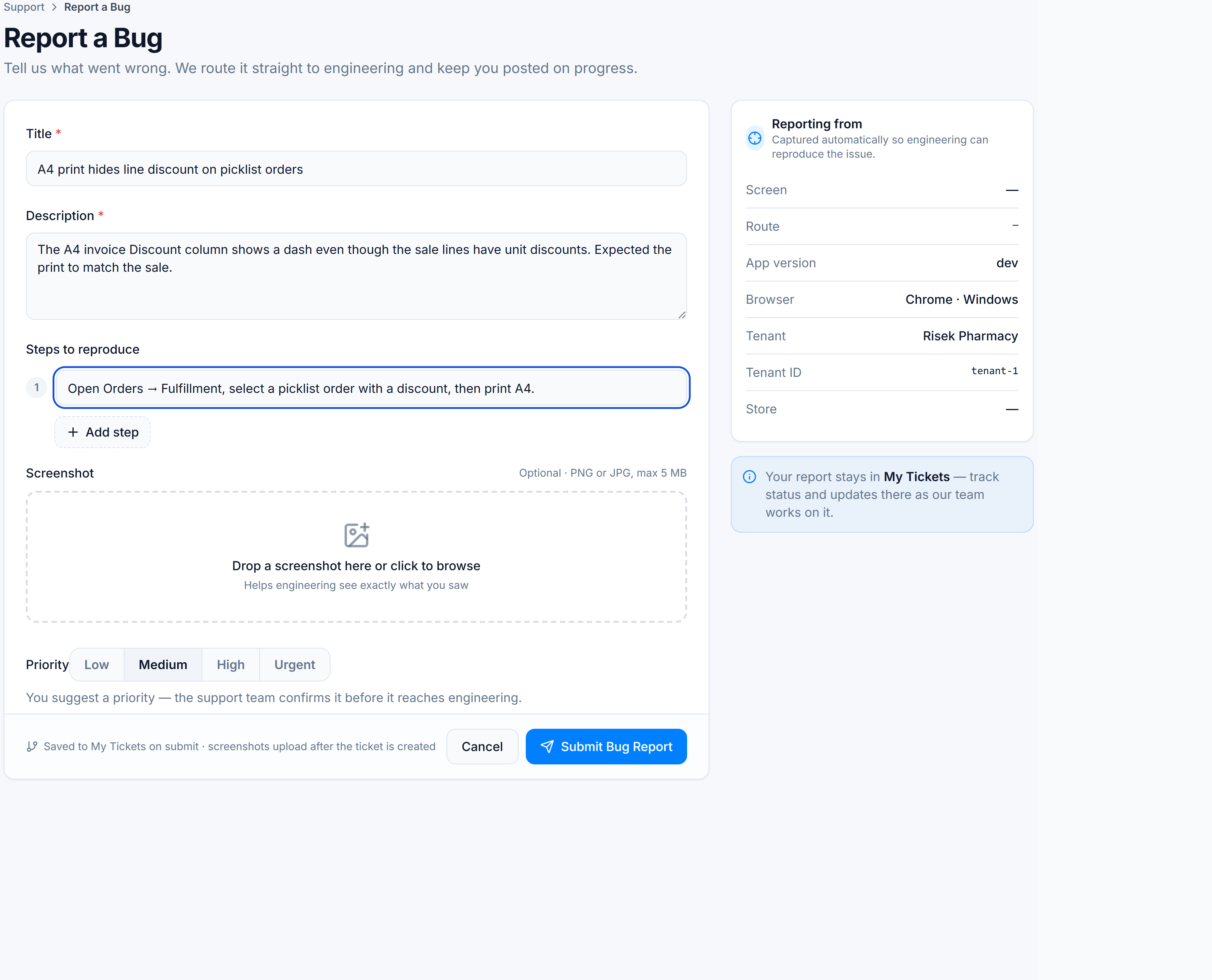
- Open Support → Help → Report a Bug.
- Enter a short Title (at least 3 characters) — e.g. “A4 print hides line discount on picklist orders”.
- Write a Description of what went wrong and what you expected.
- Add Steps to reproduce — at least one step; add more with Add step. Be concrete (which store, which menu path, which order or product if relevant).
- Optionally drop screenshots (PNG/JPG) so engineering can see what you saw.
- Choose Priority:
- Low — annoying but workable
- Medium — slows daily work (default)
- High — blocks an important workflow
- Urgent — blocks sales, stock, or compliance and needs immediate attention
- Click Submit Bug Report.
The Reporting from panel on the right captures screen, route, browser, and tenant context automatically.
Do not paste passwords, API keys, or full customer card/CNIC details into the description. Use order or transaction references when you need to point at an example.
Success looks like
You see a confirmation that the report was submitted, and the ticket appears under Support → Help → My Tickets with status Reported.
If it goes wrong
| Symptom | Cause | Fix |
|---|---|---|
| Cannot submit — validation errors | Title, description, or steps too short / empty | Fill required fields; add at least one non-empty step |
| Submit fails / network error | Session expired or temporary outage | Sign in again and retry; if it persists, note the time and contact your Ailaaj account manager |
| Form not in the sidebar | Module or permission not enabled for your role | Ask a tenant admin to confirm Support Help is available for your user |
After you submit
Track progress on My Tickets. Status meanings: Ticket statuses & fields. When a fix ships, it often appears in What’s New and the related Academy guide.