Smart Counsellor
Audience: Cashiers and pharmacists working the Smart Counter — plus anyone evaluating, selling, or supporting the feature.
Purpose: The front door to the Smart Counsellor — the AI selling layer on the Smart Counter. It explains the suggestion types, then points you to a task, a rule, or why it works the way it does.
Companion guides: Smart Counter (the screen it lives on) · Release notes.
The Smart Counsellor is an AI-assisted layer that helps a cashier sell better and serve the customer when an item isn’t available. It has three recommendation types plus a feedback loop:
Pick the kind of help you need
The Academy organises every guide as learn, do, look up, understand.
| Type | Plain meaning | When it appears | Who benefits |
|---|---|---|---|
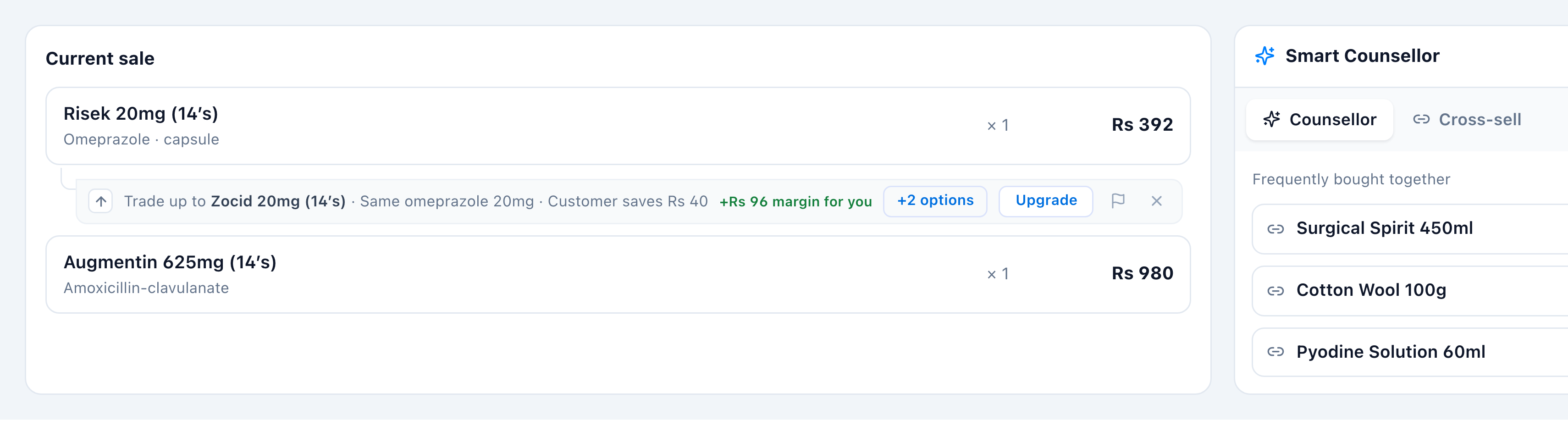
| Up-sell | ”Here’s a higher-margin version of this item.” | Auto, under a cart line | Pharmacy (margin) |
| Substitution | ”Here’s an equivalent you can sell.” | Out of stock, or select any line | Customer (availability) |
| Cross-sell | ”People who buy this also buy…” | Cross-sell tab, basket-wide | Both (basket size) |
| Report | ”This AI suggestion is wrong.” | Flag on up-sell / substitution | Model quality |
The screen
How to get there
The Smart Counsellor is the right-hand rack on the Smart Counter screen — there’s no
separate page. Open the counter in the app sidebar via Sell → Counter → Smart Counter
Sale, then use its Counsellor / Cross-sell tabs (toggle the panel with Show / Hide
Counsellor, Ctrl+S). Admins review flagged suggestions separately in the
Pharmacist Center — System Tools → Smart Counsellor → Pharmacist Center (see
Review flagged suggestions).