Order Management — Release Notes v1.4
Order Management — Operations Intelligence (v1.4)
| Release version | OMS 1.4 — “Operations Intelligence” · Ailaaj One 1.3.4 | | Release date | 17 June 2026 | | Applies to | Insights → Reports v2.0 → Operations Intelligence → Operational KPIs · Operator Productivity | | Availability | GA — tenant admin assigns View Operational KPIs Report and View Operator Productivity Report on staff roles |
What this release is
If you run a busy warehouse or hospital fulfilment desk, you have probably asked two questions at close of day: where did the queue back up? and who carried the load? Operations Intelligence adds two Reports v2 screens that answer both — without exporting raw order lists or guessing from picklist status alone.
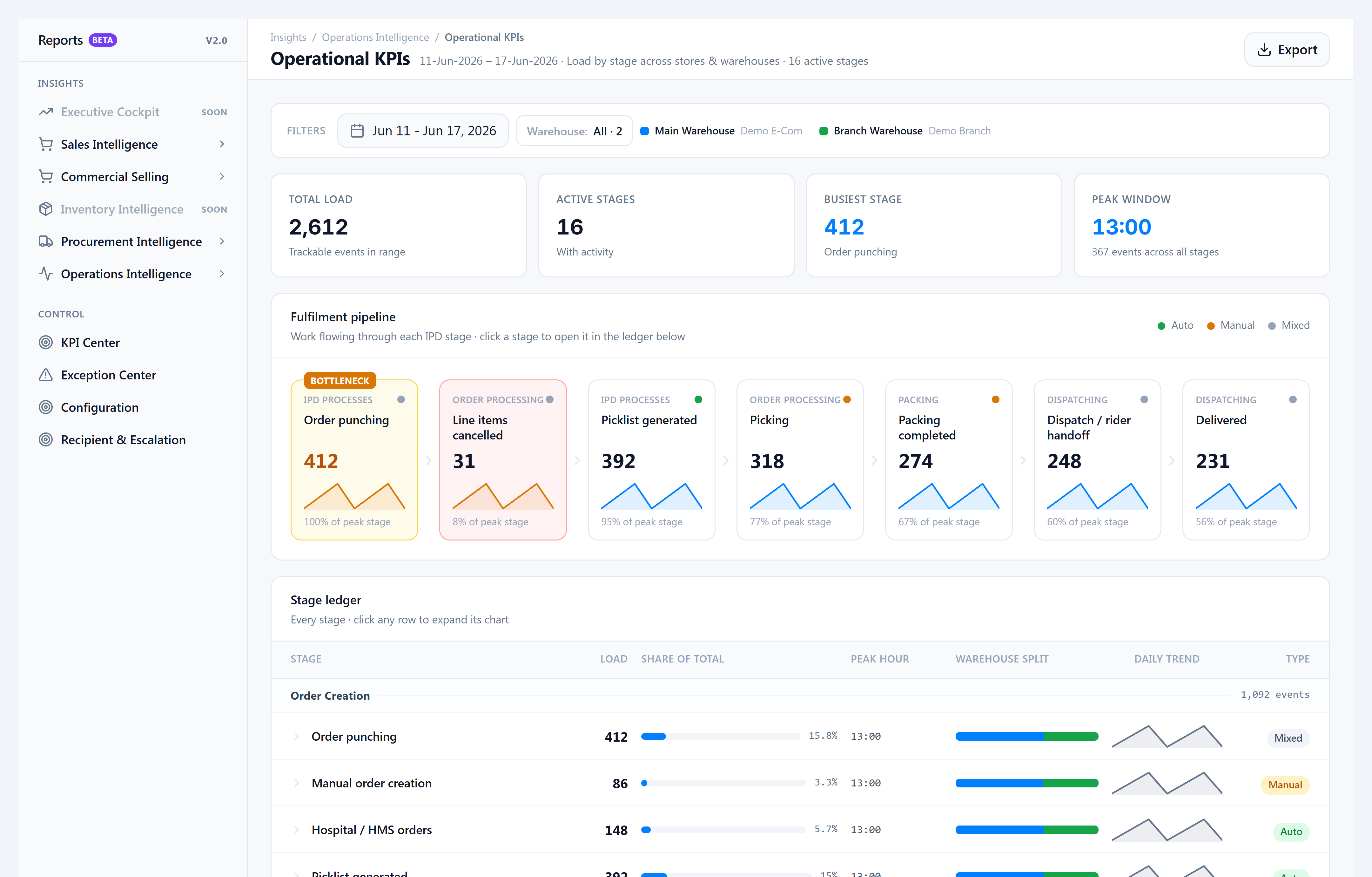
- Operational KPIs — volume by stage (orders punched, lines picked, packed, dispatched, delivered) broken down by store and warehouse, with hourly and daily charts for shift planning.
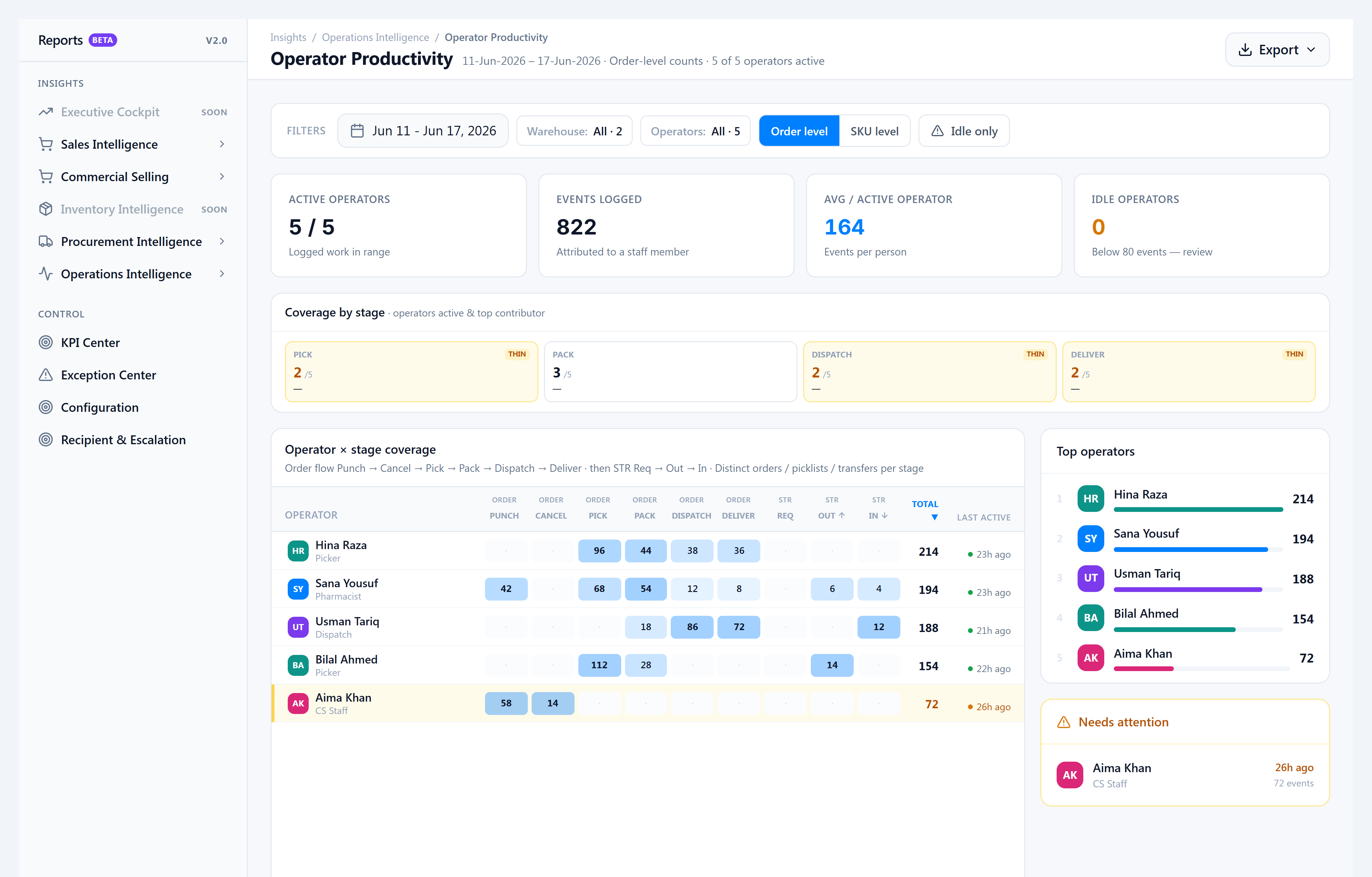
- Operator Productivity — the same stages as a staff matrix so you can review fairness, coaching, and staffing proof.
These reports are for workload and staffing, not SLA timers — use SLA Monitoring (when enabled) for threshold breaches.
New Features
- Operational KPIs — Click a stage on the Fulfilment pipeline to jump to its ledger; filter by warehouse; toggle Hourly or Daily charts; export to Excel.
- Operator Productivity — Heat matrix by staff and stage (ORDER PICK, ORDER PACK, ORDER DISPATCH, ORDER DELIVER, plus STR columns); switch Order vs SKU grain; filter idle operators; export PDF or Excel with your filters on the cover sheet.
- Dispatch & delivery credit — When staff dispatch a picklist or mark it delivered, the system remembers who did it. Past delivered picklists credit the assigned rider for delivery where that data existed.
Improvements
- Picking counts match reality — Picking load uses lines actually picked in the period, aligned with how pickers work in OMS.
- One story across both reports — Dispatch, deliver, pack, and cancel use the same rules in Operational KPIs and Operator Productivity.
- Order vs SKU grain — Toggle on Operational KPIs to view load per order or per line/sticker.
- Picklist & product stickers — Two packing metrics: shipping labels and product stickers, counted on packed picklists.
- Faster charts — Summary loads first; chart breakdowns prefetch in the background so expanding a stage is instant.
- Operator Productivity at month scale — Long date ranges no longer time out on large tenants.
- Clearer tooltips — Plain-language explanations of what each metric counts (no database jargon).
Bug Fixes
- Picking showed zero on Operational KPIs even when picklists were being picked — fixed.
- Operator Productivity timeout on 30-day ranges — fixed (RPC performance + indexes).
- Operational KPIs
max(uuid)error on expand — fixed.
Known Issues
- Not tracked badges on some rows (SKU mapping review, ward liaison, QC verify, compounding, etc.) are expected until those workflows are wired to audit data.
- Very old picklists may lack a dispatcher when no pack note was recorded — new dispatches always store the signed-in user.
Notes for operators
- Where to open: Insights → Reports v2.0 → Reports V2, then the left rail Operations Intelligence group.
- Permissions: Order Management module — View Operational KPIs Report · View Operator Productivity Report.
- Warehouse scope: Only warehouses enabled under Reports v2 → Configuration appear in filters.
- Database: Apply two prod migrations after deploy — see Prod migrate v1.4. Backfills for dispatch/delivery credit (
18220000,18230000) are already on prod.
Related docs
- Operations Intelligence guide — how-to and metric reference
- Read Operational KPIs
- Read Operator Productivity
- What’s New — 1.3.4 — timeline entry on the Academy home