Trade up to a higher-margin line
When to use this: the Counsellor found a higher-margin equivalent for an item in the cart and is offering it under the line. Trading up earns the pharmacy more margin — the customer is only charged more if you upgrade.
Steps
- Add a product to the cart on the Smart Counter screen.
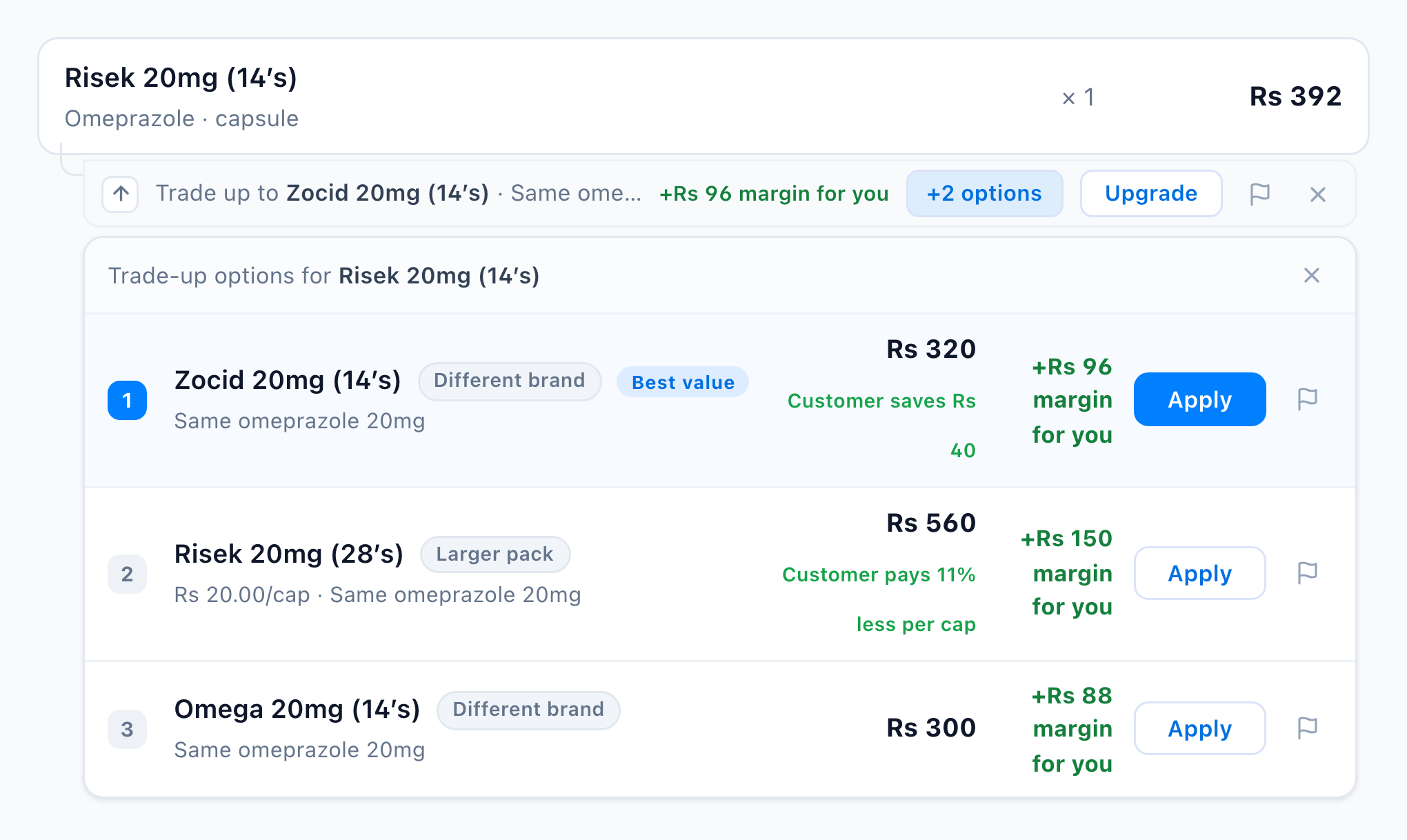
- If a higher-margin equivalent is in stock, a trade-up ribbon appears under the line — “Trade up to the suggested product · +Rs N margin for you.”
- Tap Upgrade to swap the line to the top pick, or tap +N options to open the ranked popover and Apply a specific one.
- Tap ✕ to dismiss the ribbon for this line, or the flag to report it.

You’re done when
The cart line is replaced with the chosen higher-margin product and the total updates.
Good to know
- Up-sell ranks by gross margin, not price — a higher-priced line can earn more margin. Why: Why Smart Counsellor. What gets ranked: Data requirements & thresholds.
- No ribbon? Either the item isn’t classified yet or nothing in stock has a higher margin — see Troubleshoot suggestions.