Run the Dispatch Station kiosk
Use this when a runner is picking up packed IPD bags from the rack and delivering them on own fleet — not when assigning a third-party courier from the pack screen.
Before you start
- Each runner has a tenant rider row and a printed badge QR — see Set up riders & warehouses and Print rider badge QR.
- Warehouse wall QR is posted at the return dock — Print warehouse return QR.
- Kiosk PC has a default thermal printer for trip sheets (browser print dialog).
Steps
1 · Identify
- Open
/dispatchon the kiosk browser. - Choose Scanner (USB wedge) or Camera — the choice is remembered on this device.
- Scan the runner badge (or enter the badge code manually → Continue).
- Confirm the runner name appears before continuing.
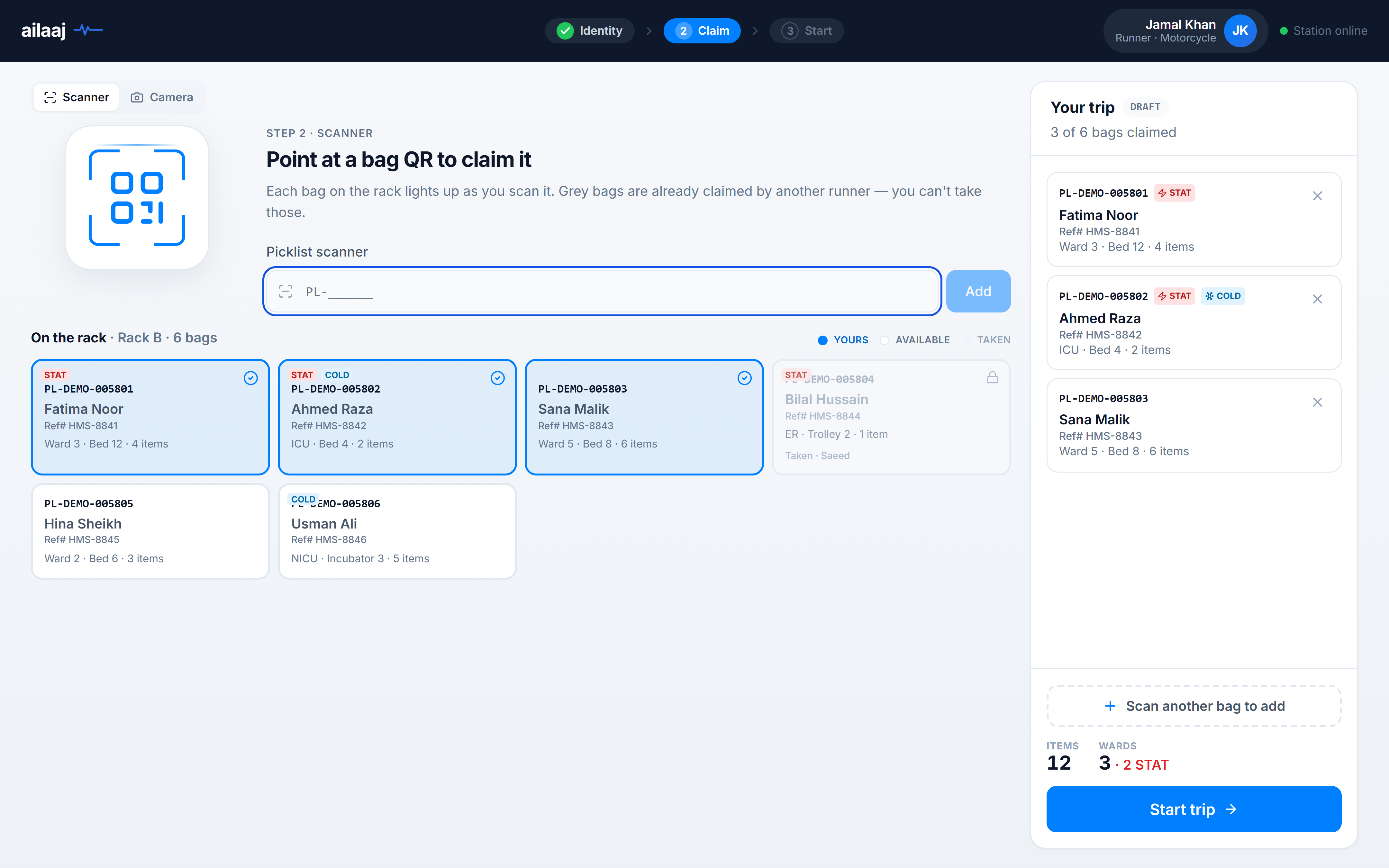
2 · Claim bags
- Scan picklist barcodes (PL-…) or tap Available tiles on On the rack.
- Yours (highlighted) = on this trip; Taken = another runner’s active dispatch.
- Each tile shows Ref# (
orders.source_reference), patient, ward · bed, and item count. - When all bags for this run are selected, click Start trip in the sidebar.
3 · Start trip
- Review Trip summary and the Bag & trip sheet preview (Ref#, MRN, ward per line).
- Click Start trip & print bag — picklists move to dispatched; trip label
TRIP-XXXXis assigned. - Attach printed sheet to the bag batch; runner leaves for wards.
4 · Return and end trip
See the dedicated End trip at the warehouse how-to for warehouse scan detail. Summary:
- Back at the warehouse, scan the same rider badge again.
- On the active trip guard, choose Go to end trip (or reprint sheet / review picklists first).
- Scan the warehouse wall QR (not the badge or trip sheet).
- Optional: add trip notes in the confirm dialog → Confirm & end trip.
- Success screen shows confetti; picklists are delivered with
Handed to {ward}and exact delivery timestamp.
Success looks like
- Picklists show dispatched after start and delivered after warehouse scan.
delivered_to_namereadsHanded to Ward 3 · Bed 12(or your ward label).actual_delivery_dateis a full date-time (trip end), not date-only.
If something goes wrong
| Symptom | What to check |
|---|---|
| Badge not recognized | Re-scan the badge slowly; confirm it is the runner badge (not a picklist or warehouse QR). Ask a supervisor to verify the rider is active and reprint the badge if the QR is damaged or outdated. |
| Bag says taken | Another runner’s active trip — finish or reassign that trip first |
| Bag says not packed yet | Picklist still packing — complete pack step first |
| Can’t end trip | Scan warehouse QR, not rider badge; trip must still be active |