Use the triage bar
When to use this: to jump straight to your part of the workflow without opening the full filter set.
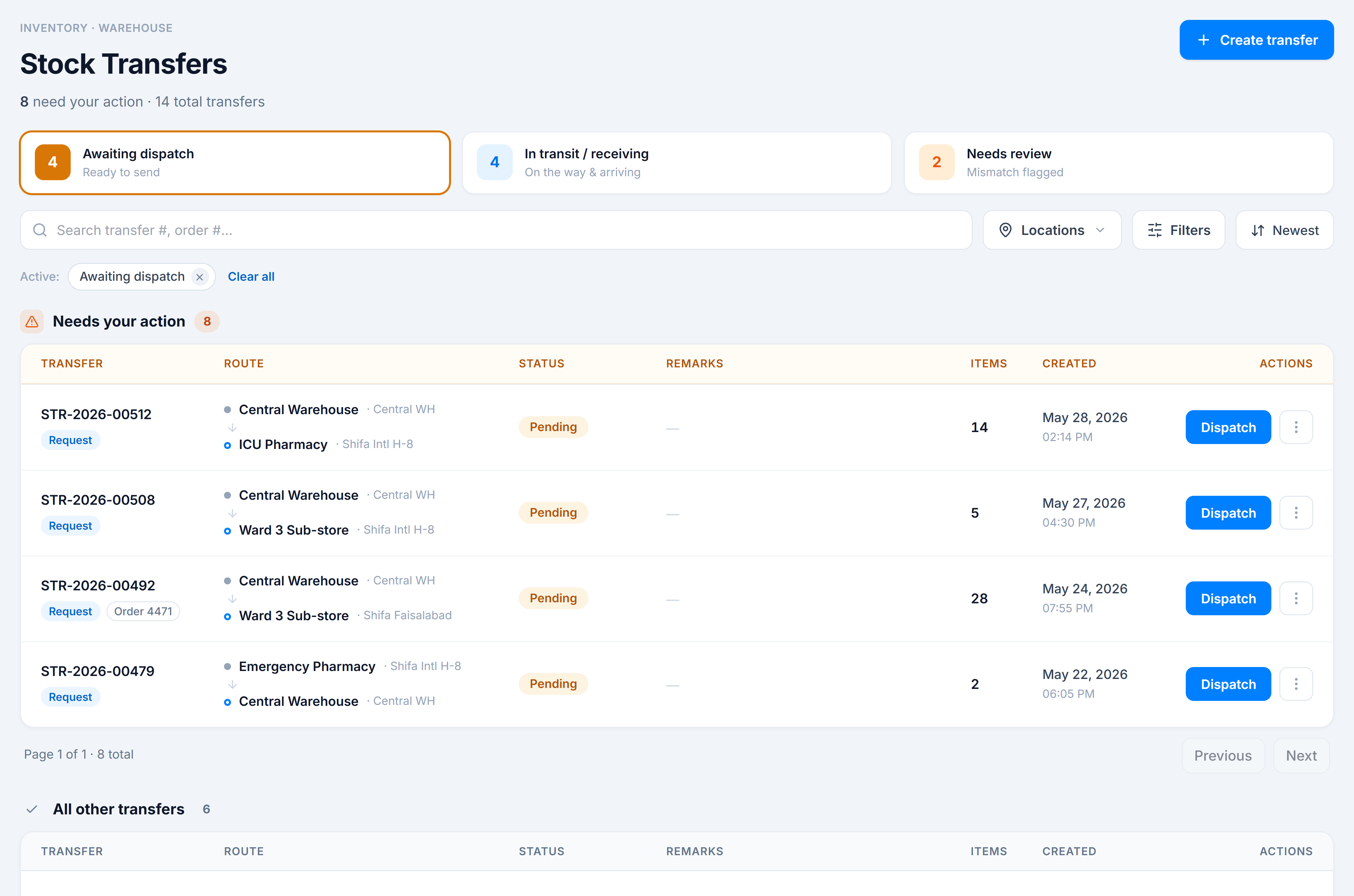
The three pills
| Pill | Shows | For |
|---|---|---|
| Awaiting dispatch | pending transfers | Dispatchers sending stock out |
| In transit / receiving | in transit + in progress | Riders confirming, units receiving |
| Needs review | anything flagged for attention (a mismatch) | Whoever reconciles short-ships |
Each pill shows a count of matching rows currently loaded, and the middle pill deliberately merges the two “moving” statuses into one bucket.
Steps
- Click a pill — the two lists narrow to just those transfers, and the pill highlights.
- Click the same pill again (or its chip’s ×) to clear the focus.
You’re done when
The lists show only the bucket you picked, and a chip for it appears in the Active row.
Good to know
- Triage is a quick focus over the rows already on screen — it’s a lighter tool than the Filters panel, which queries the server. For a global, paginated status view, use the Status filter under Find a transfer.
- Because a transfer flagged for attention can be open or a partial GRN, Needs review can surface rows in either section.