Why ingredient flags matter
A product SKU is what staff sell; an ingredient is the active pharmaceutical API inside it. When you flag an ingredient correctly once, every product that references it inherits the same regulatory behaviour — no per-SKU duplication.
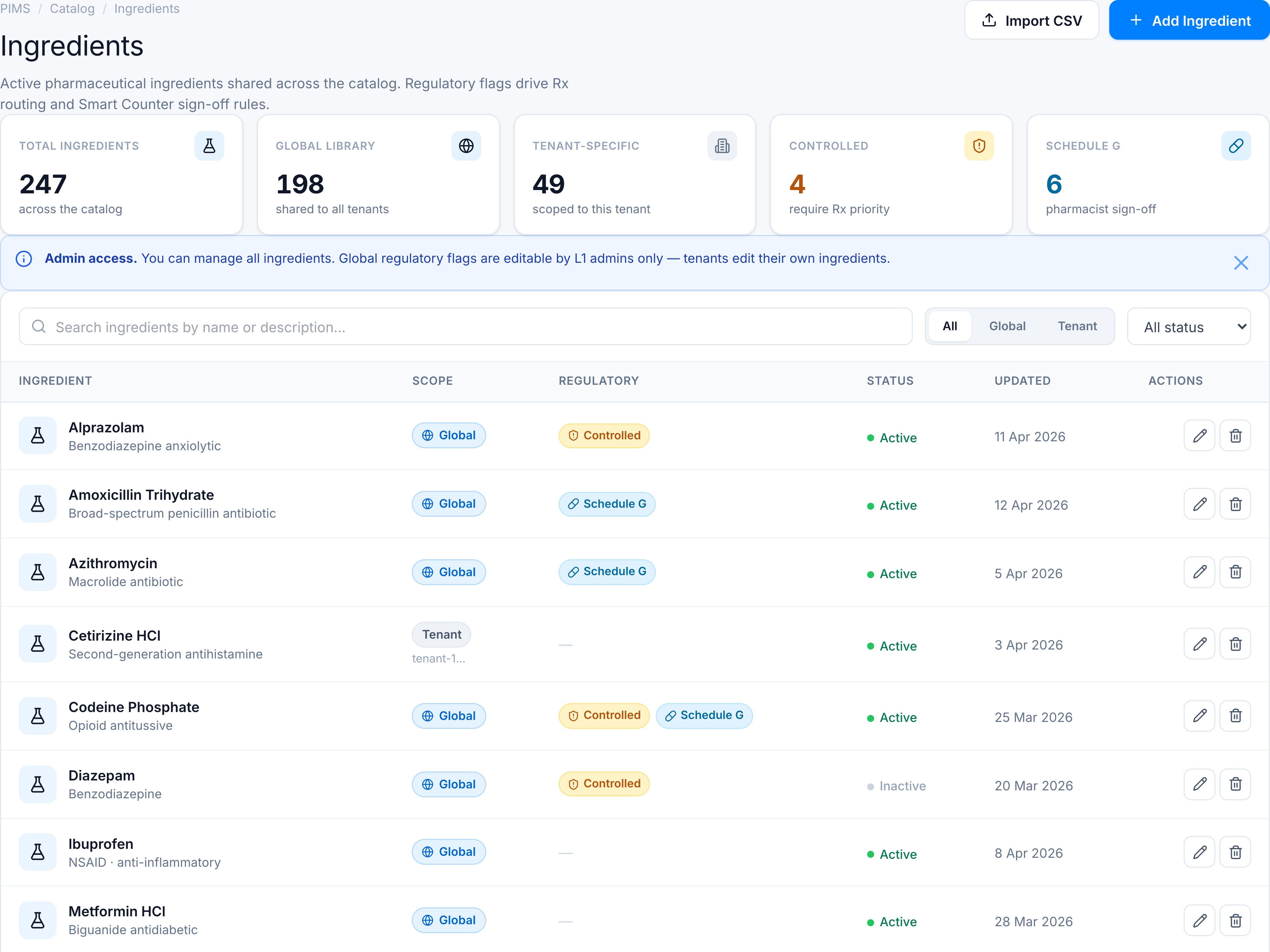
Controlled substances
Controlled ingredients trigger Rx-priority workflows — CS Command Center can prioritize API orders containing these actives, and dispensing paths treat them with tighter oversight. The amber pill is a visual cue for catalog managers auditing high-risk actives.
Schedule G
Schedule G ingredients require pharmacist sign-off at Smart Counter before the sale completes. Flagging at the ingredient level means a new generic launch automatically picks up sign-off rules when product setup links the right API.
Global vs tenant scope
Global ingredients are curated by Ailaaj platform admins — a shared library every tenant inherits (Paracetamol, Amoxicillin, etc.). Tenant-specific rows let a chain add local actives or aliases without polluting the global library. The scope pills make it obvious which rows a tenant user can edit.
Why a dedicated screen
Before this polish, ingredients lived in a generic table without KPI context or regulatory visibility. The new console answers three questions in one glance: How big is our library? How much is regulated? Can I edit this row?
For task steps see the tutorial or how-to guides.