Project demand and auto-suggest quantities
Goal: turn “what’s selling” into “what to buy” without adding products by hand. Where: the Create / Edit Purchase Order screen → the Projection mode toggle.
Projection scopes to a supplier’s catalog and asks the demand-forecast engine for each product’s sales velocity (SV, units/day). From that it suggests an order quantity:
Suggested Qty = ceil( SV × Desired Inventory Days − available stock )
It then drops those quantities straight into the order’s line items.
Steps
- Open New Purchase Order (or edit a draft) and switch the mode toggle from Standard to Projection.
- Pick a Supplier. Projection only considers products mapped to that supplier. (Optional) narrow further with Brand Filter.
- Set the projection scope — Project across stores and/or …and/or warehouses (both are multi-selects). Sales velocity and on-hand stock are combined across everything you pick. If you leave them empty, the PO’s own warehouse is used.
- Tune the controls:
- Desired Inventory Days (DIDs) — how many days of cover to order to.
- Min Suggested Qty — hide rows whose suggestion isn’t strictly greater than this.
- Exclude zero-sale — drop products with no sales velocity.
- Click Calculate Projection. The engine returns SV per product; the app computes the suggested quantities and adds them to the order items.
- Click Show Details (N) to review the table — SV /day, DIDs, Available, Coverage, and Suggested Qty per product — then adjust line items as needed and Create Order.
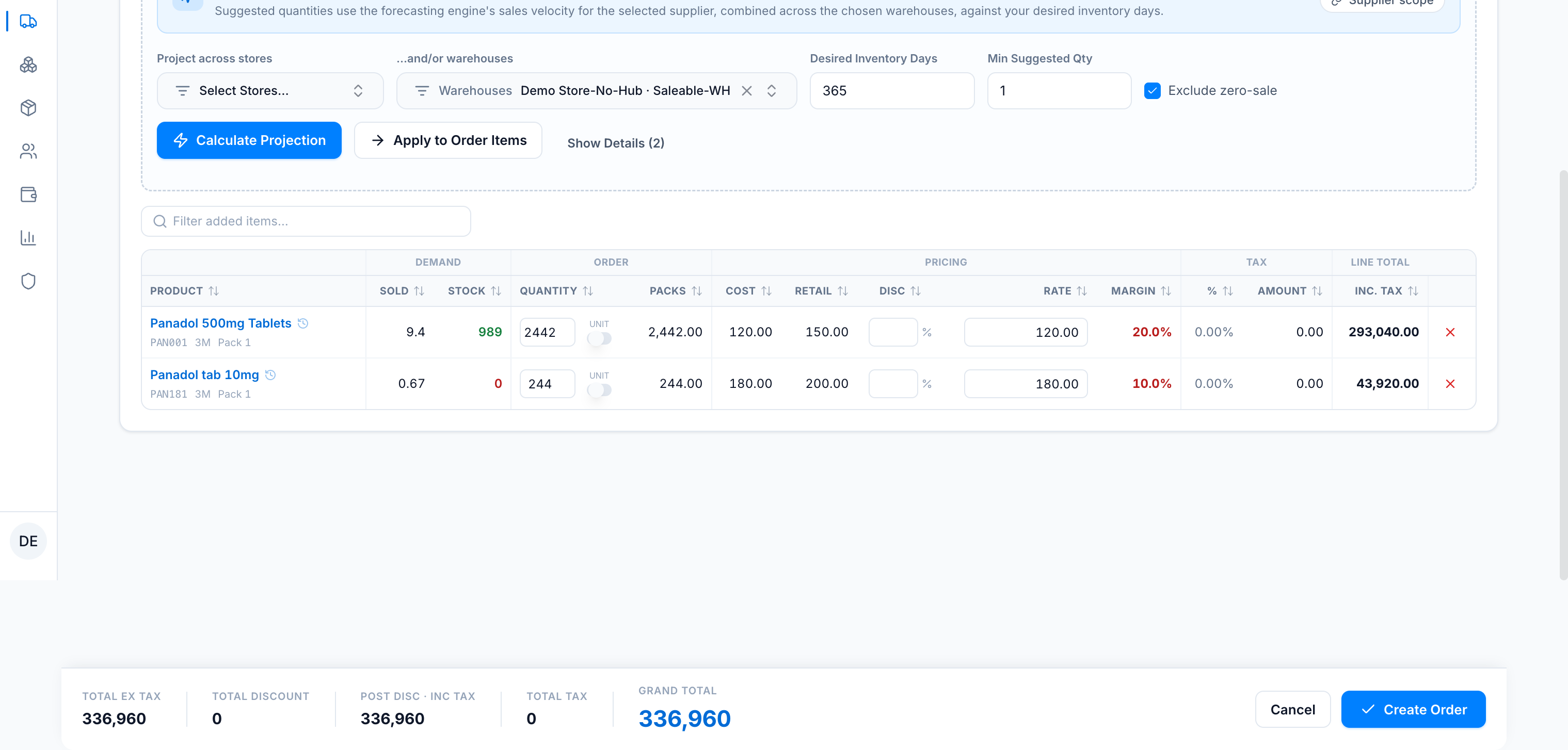
What you’ll see
On the line-item table, this sales velocity appears in the Sold column (units/day). Show Details expands the full basis behind each suggestion — matching the run shown above (DIDs = 365):
| Product | SV /day | DIDs | Available | Coverage | Suggested Qty |
|---|---|---|---|---|---|
| Panadol 500mg Tablets | 9.4 | 365 | 989 | ~105d left | 2,442 |
| Panadol tab 10mg | 0.67 | 365 | 0 | 0d left | 244 |
SV /day is shown rounded; the suggestion uses the exact velocity, so it can differ by ±1 from a hand calculation on the rounded figure.
Notes
- Only products that move and aren’t already covered show a suggestion. A product with enough stock to cover your DIDs target suggests 0 and is filtered out — that’s correct, not a bug. Raise DIDs (or lower stock cover) to see more.
- Typically only a subset of a supplier’s catalog has sales velocity (new SKUs have none), so projection naturally focuses on the movers.
- The sales velocity is the same number the Demand Forecast feature uses — see Why projection uses forecasting sales velocity.
Related
- Demand projection — reference — the exact formula, controls, and scope rules.
- Create a purchase order — the rest of the form.