Read Support & Queries
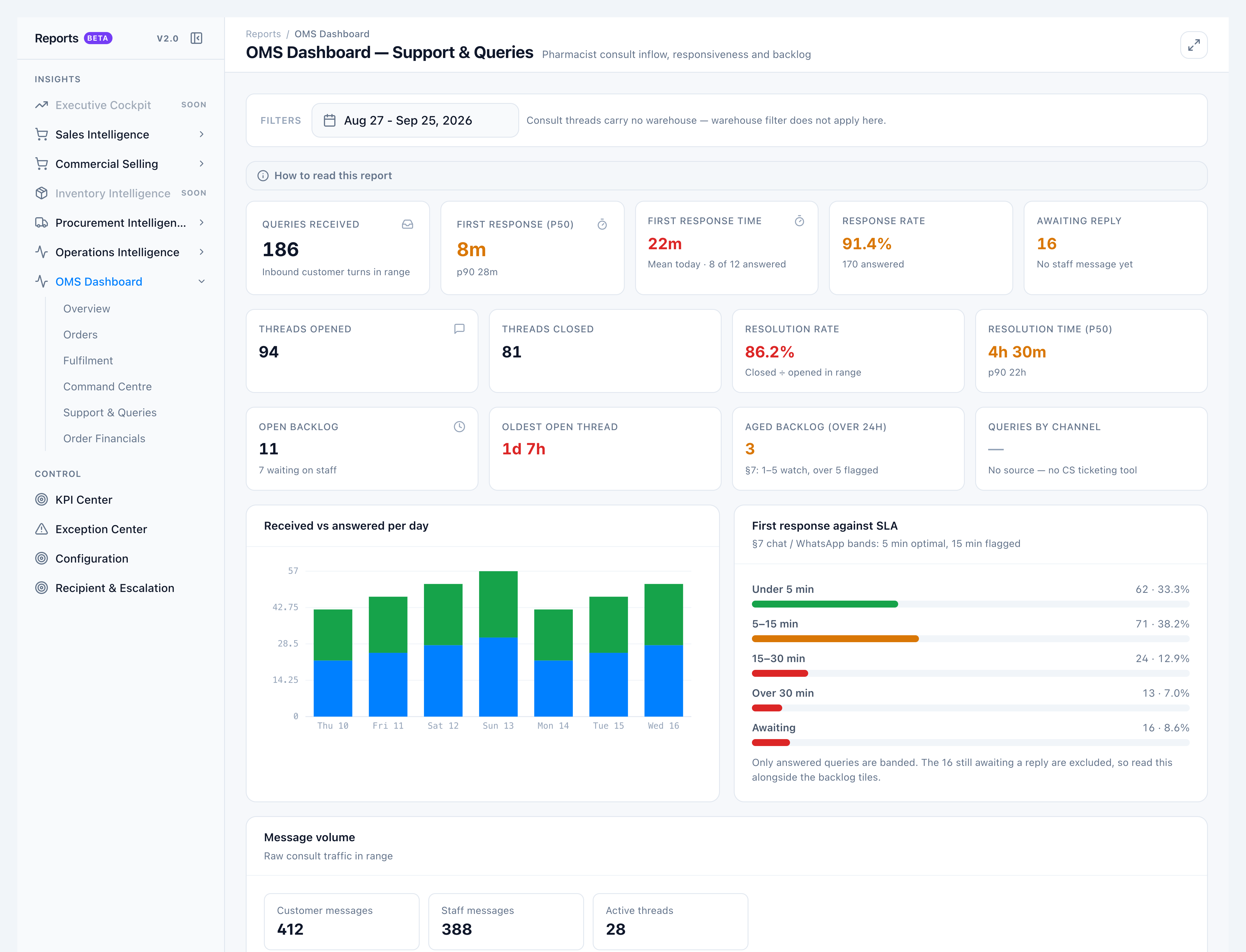
Use Support & Queries for the storefront pharmacist consult inbox — the only query store with both a received and a responded timestamp.
When to use this
- Checking how fast staff are answering customers today
- Reviewing open backlog older than 24 hours
- Matching Overview Open consult queries and First response time
Steps
- Open OMS Dashboard → Support & Queries. The filter bar explains that the warehouse chip does not apply.
- Read range tiles: Queries received, First response (p50), Response rate, Awaiting reply.
- Read First response time — mean for queries received today only. Sub-label: Mean today · X of Y answered.
- Read threads: Threads opened, Threads closed, Resolution rate, Resolution time (p50).
- Read backlog: Open backlog, Oldest open thread, Aged backlog (over 24h).
- Queries by channel stays blank with No source — no CS ticketing tool.
Success looks like
- Responded + awaiting = received (for inbound turns).
- Open backlog matches Overview Open consult queries.
- First response time matches Overview, even if the date range is last month.
If it goes wrong
- Queries look lower than “messages” — A query is one inbound turn, not every customer bubble. Consecutive customer messages count as one query.
- Warehouse filter ignored — Consult threads carry no warehouse. This is by design.