Read the Command Centre
Use Command Centre when you need the floor right now — not last week’s history.
When to use this
- Shift lead checking SLA risk before adding pickers
- Confirming a draft order is not counted as live work
- Comparing live tiles with Overview
Steps
- Open OMS Dashboard → Command Centre.
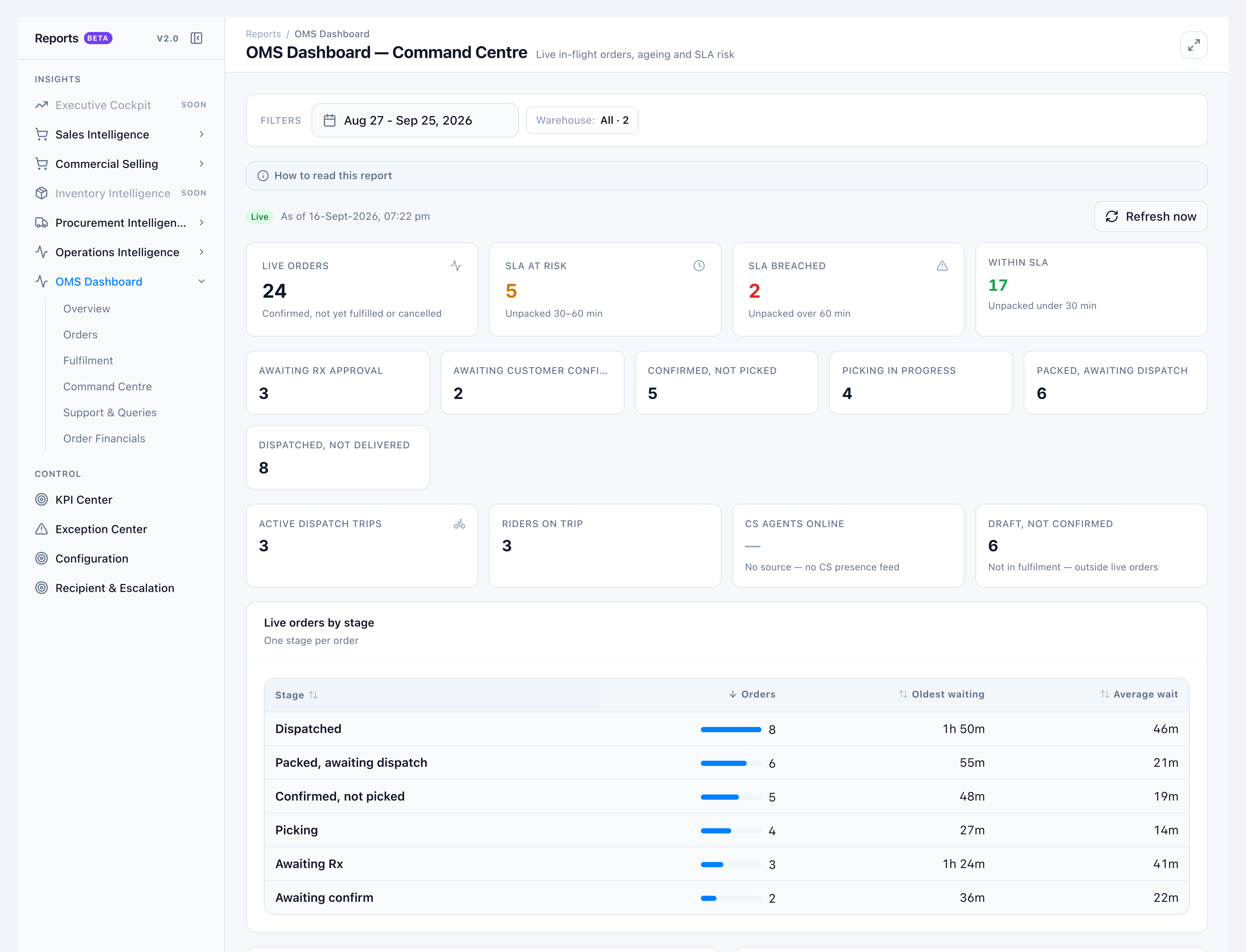
- Read Live orders — confirmed and partially fulfilled only. Sub-label: Confirmed, not yet fulfilled or cancelled.
- Read SLA: Within SLA (≤ 30 min unpacked after confirm), SLA at risk (30–60 min), SLA breached (> 60 min). Dispatched work is not counted as breached.
- Walk the queues: Awaiting Rx approval, Awaiting customer confirm, Confirmed, not picked, Picking in progress, Packed, awaiting dispatch, Dispatched, not delivered.
- Draft, not confirmed is separate — Not in fulfilment — outside live orders.
- CS agents online stays blank with No source — no CS presence feed.
Success looks like
- Changing the date range does not change live counts; changing warehouse does.
- Live tiles match Overview for the same warehouse.
- A new draft increments Draft, not confirmed only.
If it goes wrong
- Long ageing tails — Scheduled hospital supply confirmed well ahead of picking is expected; the panel notes this.
- Numbers stale — Wait ~30 seconds, or use the refresh control on the tab.