Review triggered lines
Goal: see which SKUs need a buy, and which already have a PO or a GRN. Where: Replenish Stock → Planning → Reorders, then open a system.
Steps
- On Reorder Systems, click the system name. For the demo, open October running items — Block B & Block C.
- Stay on Essentials. Lines sit in three sections:
- Needs PO — still to buy. The demo holds paracetamol and amoxicillin.
- Awaiting Delivery — a PO exists. The demo holds ORS on PO-DEMO-1041.
- Received — a GRN is in. The demo holds vitamin C on GRN-DEMO-220.
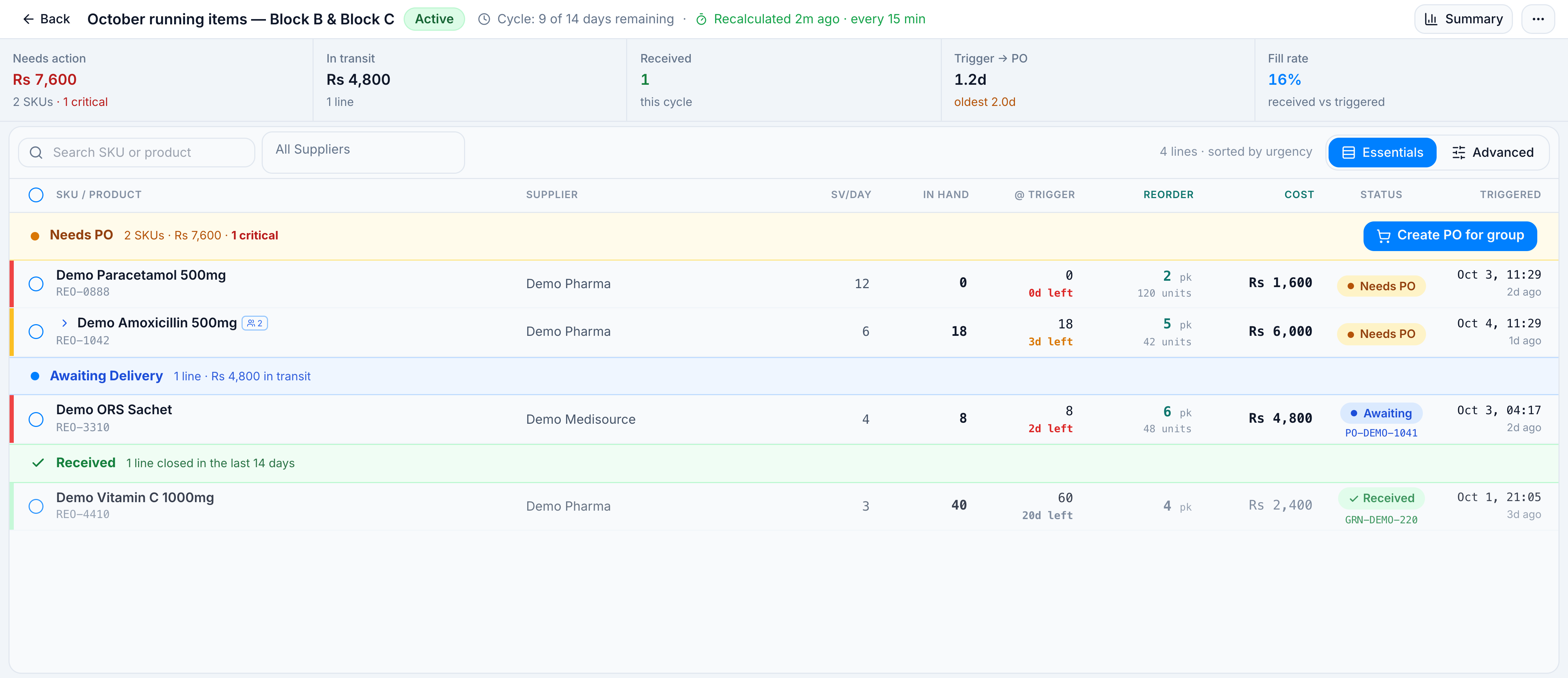
- Use Search SKU or product or All Suppliers to narrow the list. The count reads
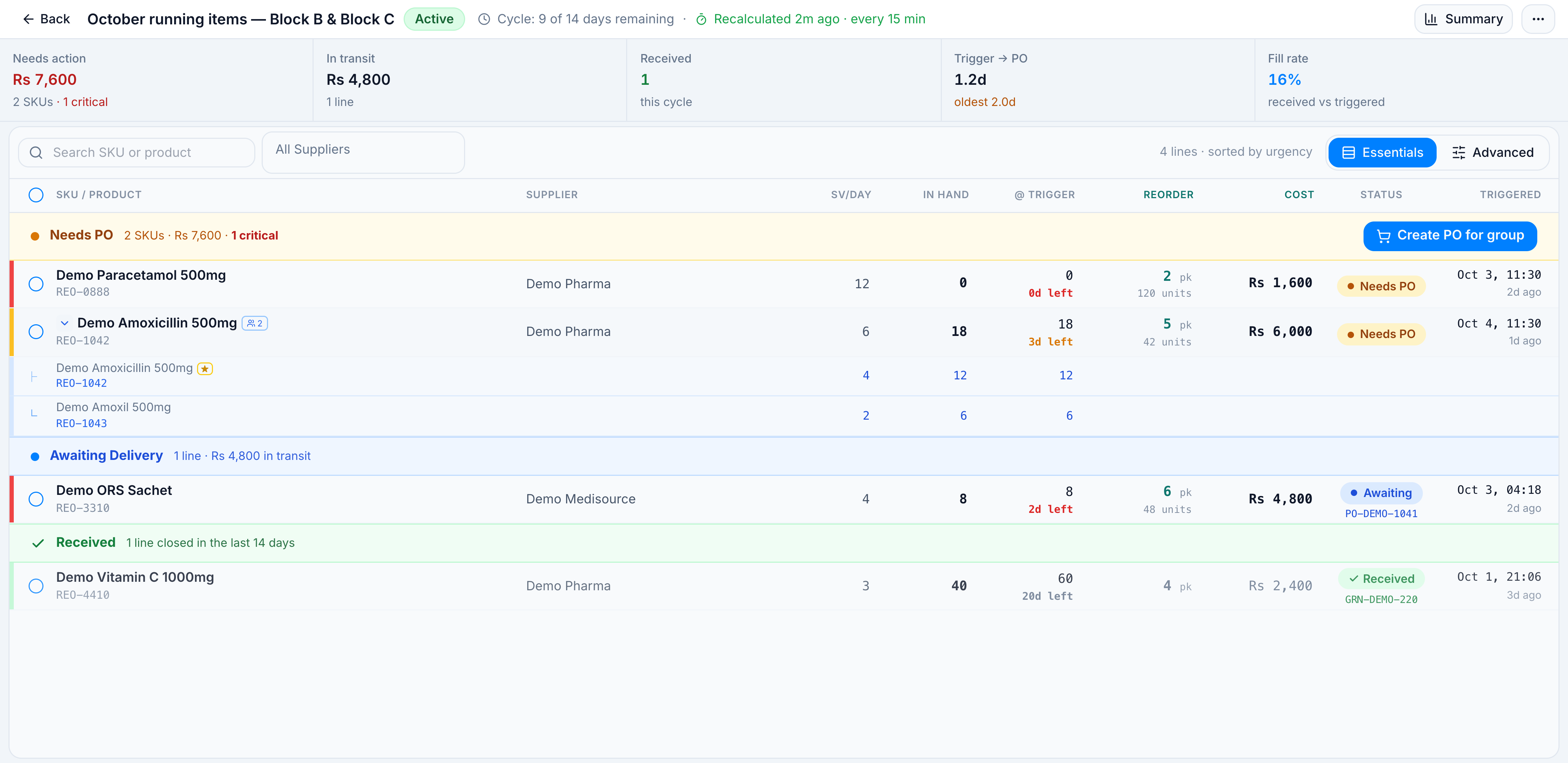
N lines · sorted by urgency. - Click a grouped row to see members. Amoxicillin expands to REO-1042 (primary) and REO-1043 (alternate).
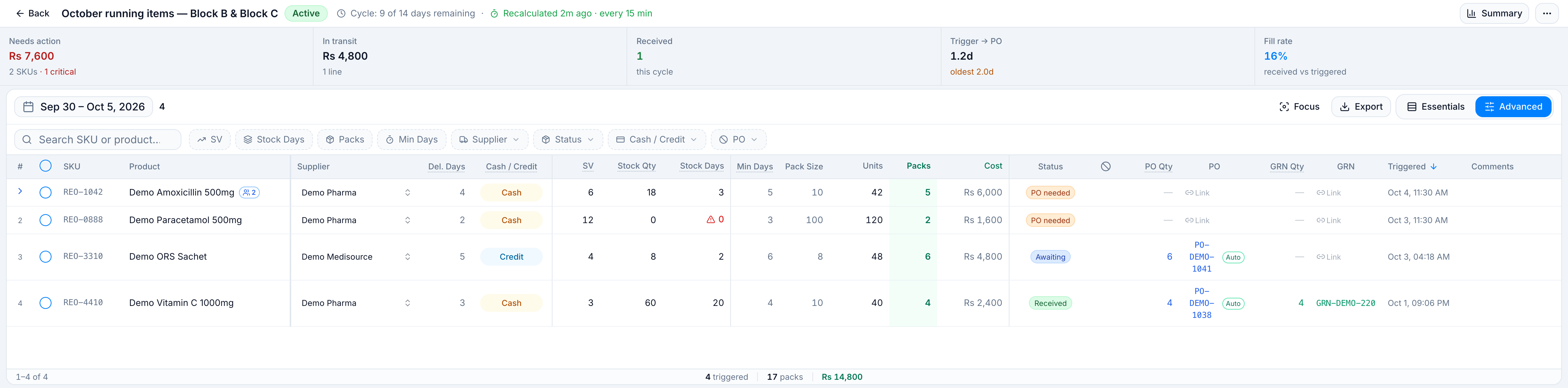
- Switch to Advanced for Stock Days, Min Days, Units, Packs, Cash / Credit, PO, and Comments. Range chips are SV, Stock Days, Packs, and Min Days.
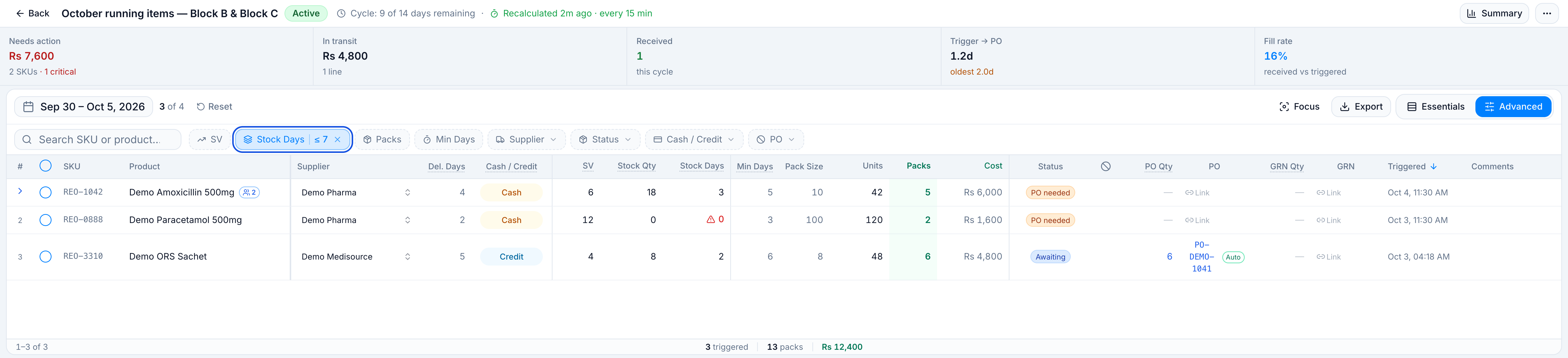
Set Stock Days to a maximum of 7 when you only want short cover. The chip reads ≤ 7. On the demo, vitamin C (20 days) drops off and the list reads 3 of 4.
- To refresh numbers on a cloud session, open the ⋯ menu and click Recalculate. The header shows the cloud job. On the demo it reads Recalculated 2m ago · every 15 min. The same menu’s Auto (60m) switch is the interval saved on this system.
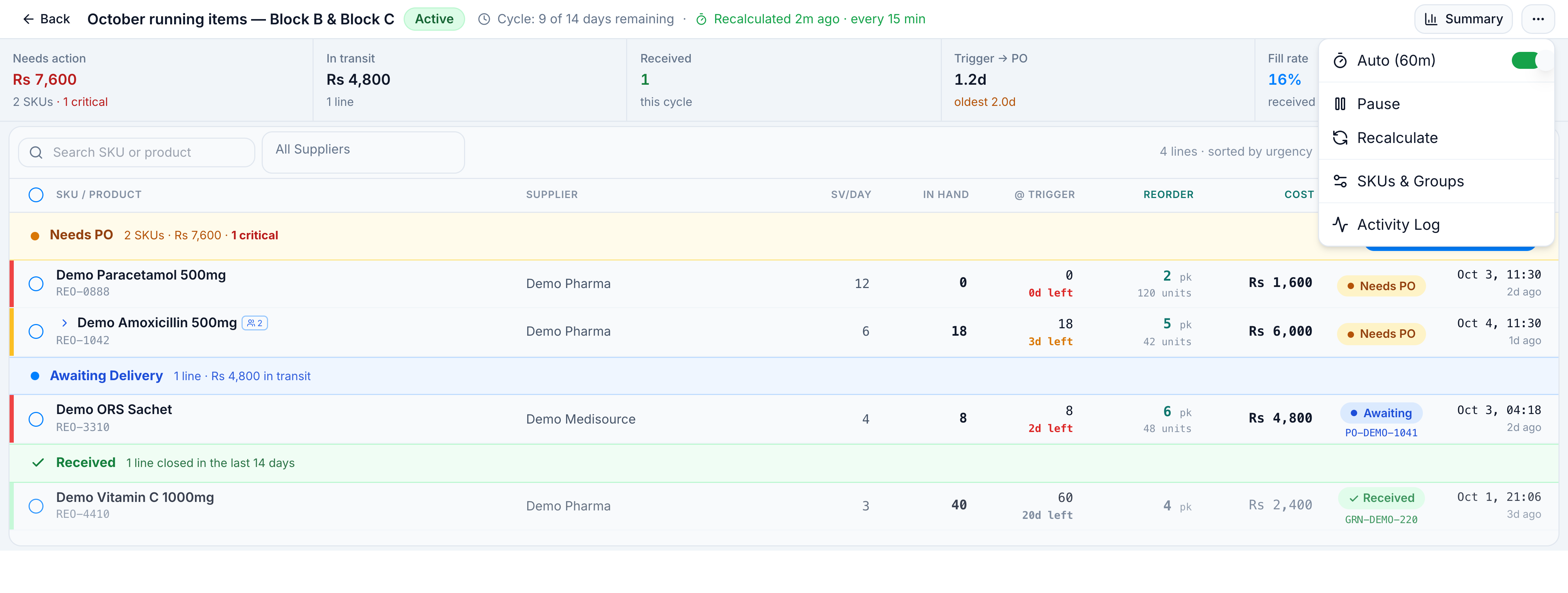
In hand on Essentials is live stock. @ Trigger is the stock snapshot from when the line was calculated. They can differ if sales continued after the last recalc.
A line flagged Excluded is left out of Create PO. It returns on its own after 4 days, or sooner if you click Excluded.
Pause, archive, and purge
On the list, the row menu (⋯) has View, Check Configurations, Modify Configurations, Pause / Resume, Archive, Purge & Regenerate Lines, and Delete.
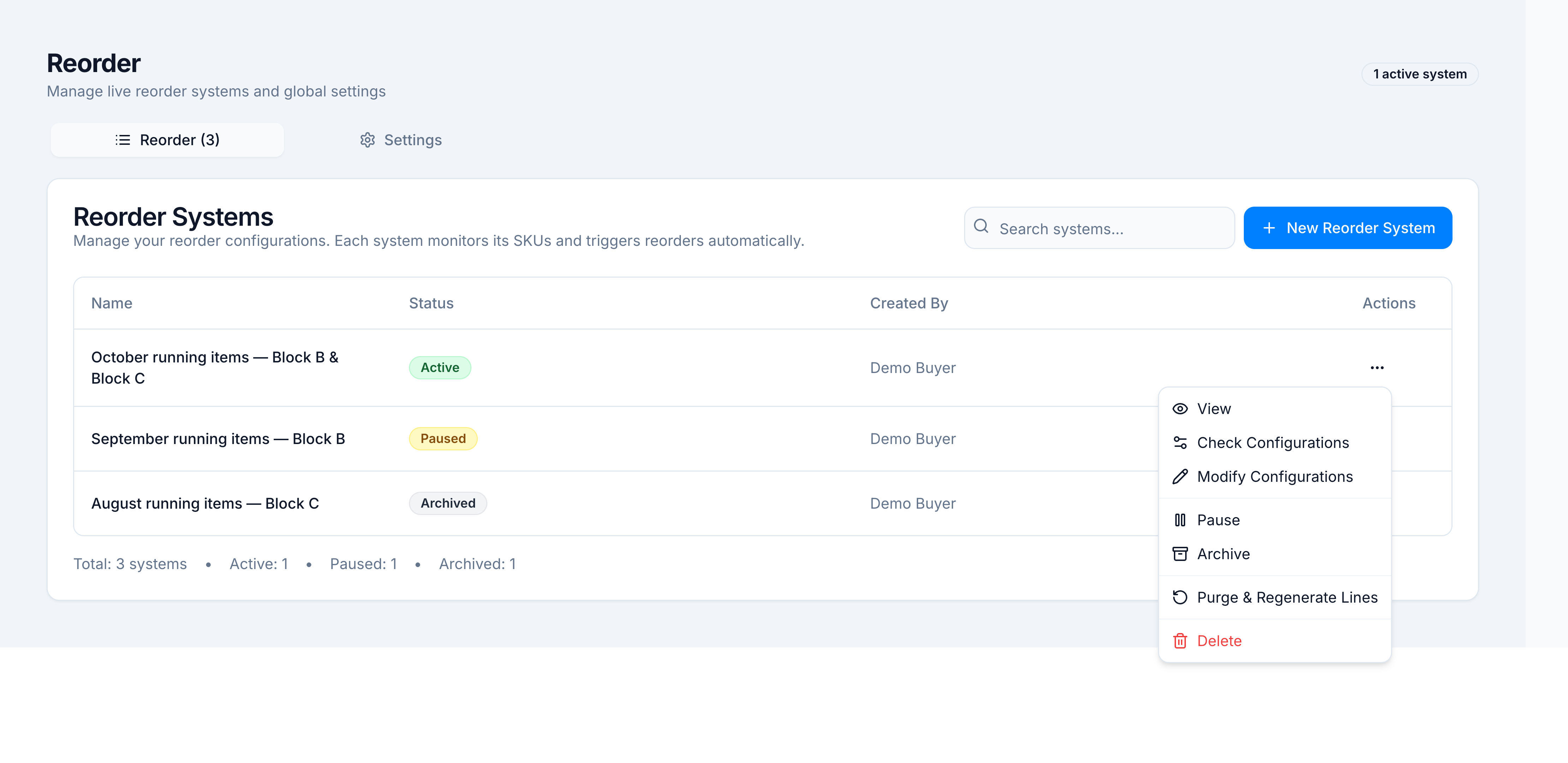
| Action | What it does | Demo |
|---|---|---|
| Pause | Stops the system. Resume sets it Active again. | Header badge becomes Paused |
| Archive | Files the system off the working set | Status Archived. Recalculate is disabled |
| Purge & Regenerate Lines | Deletes current-cycle lines with no PO (PO Needed). Lines already on a PO stay | Confirm Purge Lines |
| Delete | Removes the system and its reorder data | Confirm Delete. This cannot be undone |
| Modify Configurations | Edits this system’s cycle, buffer, and warehouses | Toast Configuration updated |
Purge success: Purged N lines without POs. M PO'd lines kept. Cron will regenerate on next run. If nothing qualifies: No lines to purge — all lines already have POs or are archived.
The same Pause, Resume, Recalculate, SKUs & Groups, and Activity Log actions are on the system’s ⋯ menu. SKUs & Groups is where you add a SKU after creation. The toast is SKU added — recalculate to see updated lines.
If it goes wrong
| What you see | Cause | What to do |
|---|---|---|
No SKUs triggered yet. Recalculate to check for reorder needs. | Nothing is through its minimum cover | Recalculate, or check that SKUs and warehouses are on the system |
No lines match the current filters. | Search or supplier filter is too tight | Clear search and All Suppliers |
No systems match your search. | The list filter does not match a name or creator | Clear Search systems… |
Recalculate (offline) and the item is disabled | The register is not on the cloud | Reconnect. The toast if you still fire it is Recalculation requires cloud connection. Please connect to the internet and try again. |
Last recalc Nm ago (stale) in amber | Auto-recalc missed its interval | Use Recalculate once you are online |
Reorder system not found | The link is stale or the system was deleted | Back to Reorders and open it from the list |