Send or download a PO to a supplier
Goal: get a purchase order to the supplier. Where: the row Actions (⋯) menu on the Purchase Orders list.
Download the PO
- Open the row Actions (⋯) menu → Download PO.
- A supplier-facing PDF (brand-grouped line items and quantities) downloads to your device. Hand it over however you like.
Send via WhatsApp or email
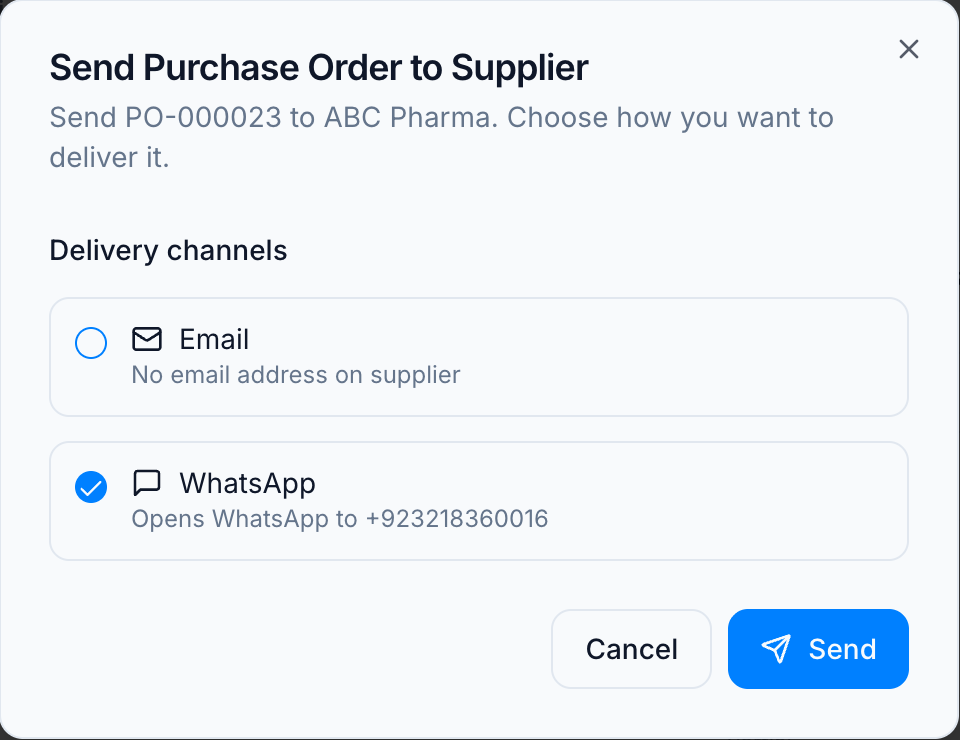
- Open the row Actions (⋯) menu → Send to Supplier.
- In the dialog, pick one or both delivery channels:
- Email — sends a branded email with the PO summary and a link to the PO PDF. It goes to the supplier’s saved primary-contact email, so it’s available only when the supplier has an email address on file.
- WhatsApp — opens a wa.me click-to-chat to the supplier’s number with a pre-filled message that includes a link to the PO PDF. No store WhatsApp number or integration is required — it uses your own WhatsApp.
- Click Send.
Rules
- Sending is an action, not a status change. Sending (or downloading) does not move the PO to a “Sent” state — the workflow is Draft → Pending Approval → Approved → Completed.
- WhatsApp can’t carry a true file attachment, so the PO is shared as a short link to a hosted PDF. The link uses an unguessable random filename, so only someone who has the exact link (i.e. the supplier you sent it to) can open it. The document stays available at that link — it does not expire — so treat the link as you would the PO itself.
- On Send, you’ll get an error if a chosen channel is missing its recipient — e.g. the supplier has no email (for Email) or no phone number (for WhatsApp).
- The email recipient and contents come from the purchase order itself, not from anything typed at send time — the address is the supplier’s saved contact, and the figures are the PO’s own. Keeping the supplier’s contact details current keeps the email correct.
Related
- Purchase order statuses — why “Sent” isn’t part of the lifecycle.