Pending Stock — Feature & User Guide
Audience: Operations & fulfillment managers, purchasing, and warehouse staff.
Purpose: Track every order line that can’t be filled from shelf stock yet, and drive it to fulfillment.
Companion docs: part of Order Management.
When an order line can’t be filled from the shelf, it becomes a pending item. The Pending Stock screen is where you see everything that’s waiting and move it forward — by transferring stock in, raising a purchase order, offering an alternate, or setting an ETA.
1. Two kinds of pending
| Kind | Meaning | How it’s resolved |
|---|---|---|
| Internal pending | The product exists elsewhere in your network. | A stock transfer is raised; the line fulfils once the transfer is received. |
| True pending | No warehouse has it. | Purchasing raises a purchase order; when that stock arrives it auto-transfers to fulfil the order. |
A line can also be covered by offering an alternate (substitute) product, or marked Short when it genuinely can’t be sourced.
2. Where to find it
Open Sell → Exception → Pendings (the Pending Stock screen). The header shows how many orders or products are pending, and four tabs split the work:
| Tab | Shows |
|---|---|
| Orders | Pending grouped by order — pending quantity, amount, and ETA per order. |
| Products | Pending grouped by product — total pending, how many to order, status, ETA, alternate and transfer state. |
| STR Covered | Items already covered by an in-flight stock transfer. |
| Alternates | Suggested substitute products awaiting approval. |
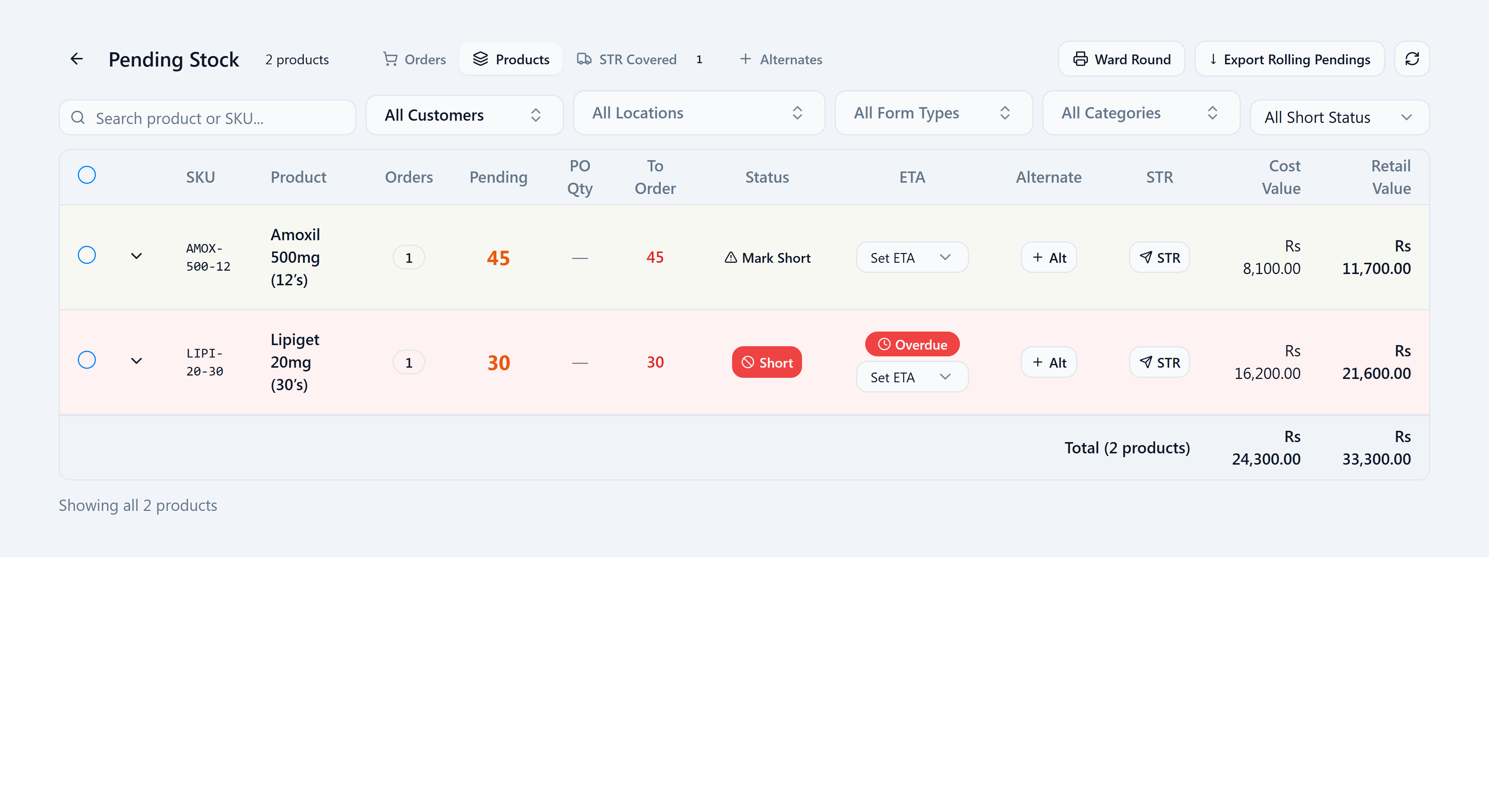
3. Action tags & what they mean
Each row carries action tags that tell you the state and the next step:
| Tag / control | What it means |
|---|---|
| To Order (number) | How many units still need to be purchased. |
| Covered | Already covered (by a transfer or PO) — nothing to order. |
| Mark Short / Short | Flag a line as short in the market; Short (red) means it’s currently flagged. |
| ETA | Set an expected-arrival window (2h–6 days) so staff and customers know the wait; an overdue ETA is highlighted. |
| Alt / Alt Suggested | Offer a substitute; Alt Suggested means one is proposed and awaiting approval. |
| STR (or ST-####) | Raise a stock transfer, or the number of the transfer already covering this line. |
The header actions work across selected rows: Create PO, Create STR, and Ward Round (a printable round for hospital pendings).
4. Resolve a pending item
- On the Products tab, review what’s pending and how much is To Order.
- If stock exists elsewhere, Create STR — the line then shows under STR Covered with its transfer number.
- If no warehouse has it, Create PO so purchasing can order it. When that stock is received it auto-transfers to fulfil the order.
- Where a substitute is fine, use Alt to suggest an alternate; once approved it can be transferred in its place.
- Set an ETA so the wait is visible, or Mark Short if it can’t be sourced.
Stock transfers are created automatically (or by you), but a warehouse still has to dispatch the transfer and the receiving warehouse has to receive it. Stock isn’t reserved for the order until the transfer is received.
5. FAQ & troubleshooting
“An item shows as pending — what happens next?” If stock exists elsewhere, a transfer is raised and the item appears under STR Covered; it fulfils once the transfer is received. If no warehouse has it, it shows as To Order, and once purchasing’s stock arrives it auto-transfers to fulfil the order.
“What’s the difference between internal pending and true pending?” Internal pending means stock is already on its way via a transfer. True pending means no warehouse has it, so it has to be purchased.
“A transfer was created — why hasn’t the stock moved?” A transfer only requests the move. The source warehouse still has to dispatch it and the destination has to receive it. The stock isn’t reserved for your order until it’s received.
“What does Covered mean in the To Order column?” The pending quantity is already covered by a transfer or purchase order, so there’s nothing more to order.
“How do I tell a customer when to expect a pending item?” Set an ETA on the row. Overdue ETAs are flagged so staff can follow up.